

5.1a Configuration Basics
Control OpenCode's core behavior through the opencode.json configuration file.
📝 Course Notes
Key takeaways from this lesson:
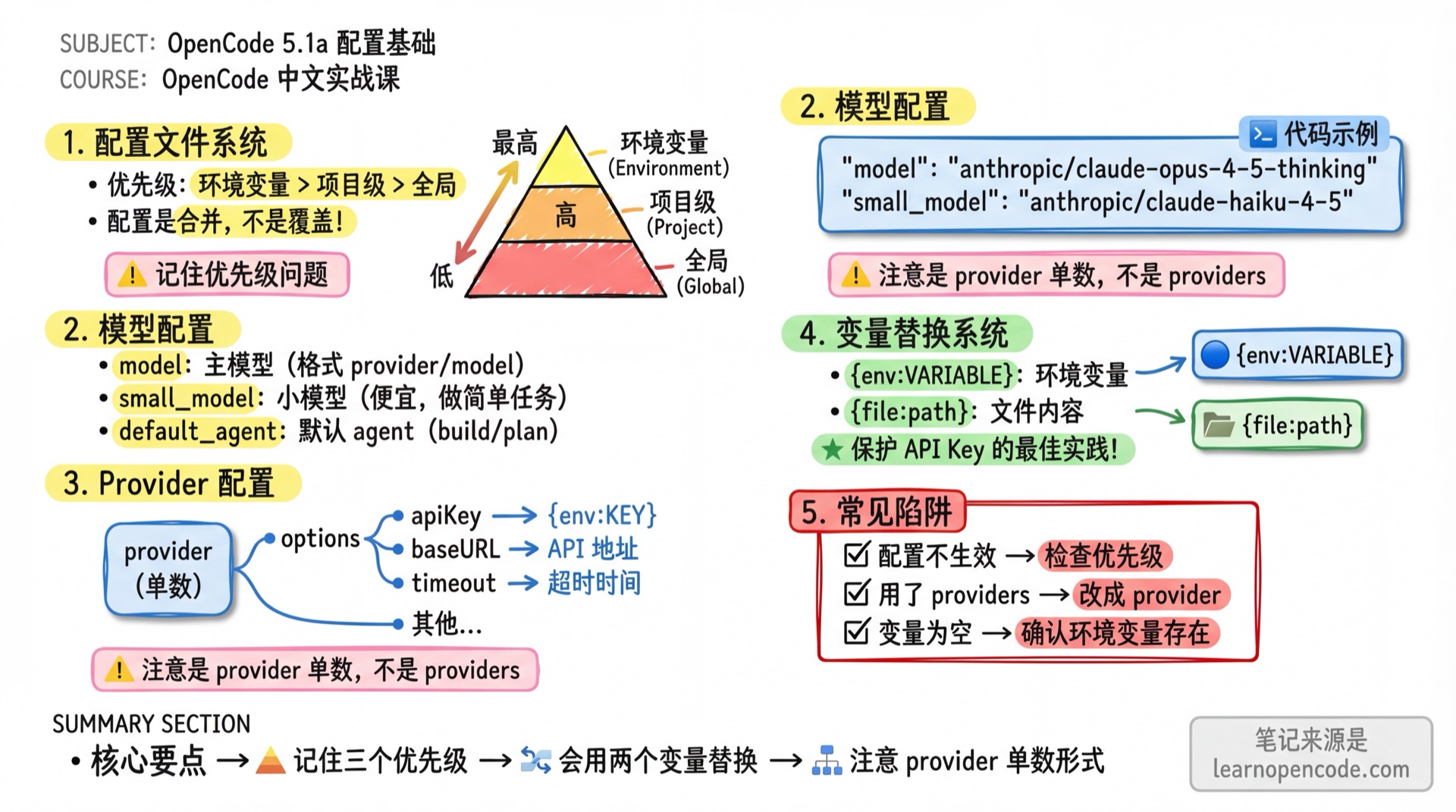
What You'll Learn
- Understand configuration file locations and priority
- Master model and Provider configuration
- Use variable substitution for dynamic configuration
- Configure username and auto-update
Your Current Challenge
- Have to manually set things up every time, don't know how to save configuration
- Don't want to write API Keys in plain text in configuration
- Don't know how to configure multiple Providers
When to Use This
- When you need to: Personalize OpenCode's behavior
- And don't want to: Reset everything each time you start
Configuration File Locations
OpenCode loads configuration in the following order, from lowest to highest priority (later ones override earlier ones):
| Priority | Location | Description |
|---|---|---|
| 1 (lowest) | Remote .well-known/opencode | Remote organization default config (obtained via Auth mechanism) |
| 2 | ~/.config/opencode/opencode.json(c) | Global user configuration |
| 3 | OPENCODE_CONFIG environment variable | Custom config file path |
| 4 | ./opencode.json(c) | Project configuration, discovered by walking upward from the directory you opened |
| 5 | ./.opencode/opencode.json(c) | Configuration in the project's .opencode directory |
| 6 | OPENCODE_CONFIG_CONTENT environment variable | Inline config content (JSON string) |
| 7 (highest) | Managed config directory | Enterprise deployment, admin-controlled |
Configuration files are merged, not replaced. Later configurations override conflicting keys from earlier ones, but non-conflicting settings are preserved.
Managed Config Directory (Enterprise Deployment)
In enterprise environments, administrators can place configuration in system-level directories with the highest priority, overriding all user and project configurations:
| Platform | Path |
|---|---|
| macOS | /Library/Application Support/opencode |
| Windows | %ProgramData%\opencode |
| Linux | /etc/opencode |
Regular users generally don't need this, just be aware it exists.
Configuration Directory Structure
~/.config/opencode/
├── opencode.json       # Global configuration
├── tui.json            # Global TUI configuration
├── AGENTS.md           # Global rules
├── agent/              # Global Agents
├── command/            # Global commands
└── plugin/             # Global plugins

Project directory/
├── opencode.json       # Project configuration (priority 4)
├── tui.json            # Project TUI configuration
├── AGENTS.md           # Project rules
└── .opencode/
    ├── opencode.json   # Project configuration (priority 5, recommended)
    ├── tui.json        # Project TUI configuration
    ├── agent/          # Project Agents
    ├── command/        # Project commands
    └── plugin/         # Project plugins
Configuration Format
Supports JSON and JSONC (JSON with comments):
{
  "$schema": "https://opencode.ai/config.json",
  // This is a comment, JSONC format supports it
  "model": "anthropic/claude-opus-4-5-thinking"
}
The main configuration file may be named
opencode.jsonoropencode.jsonc. V2 configuration discovery recognizes only these two names; the compatibility loader still reads the legacy global file~/.config/opencode/config.json. If no global configuration exists, the current loader createsopencode.jsoncby default. Unknown top-level fields are ignored rather than reported as errors.
Model Configuration
Main Model and Small Model
{
  "$schema": "https://opencode.ai/config.json",
  "model": "anthropic/claude-opus-4-5-thinking",
  "small_model": "anthropic/claude-haiku-4-5"
}| Field | Description |
|---|---|
model | Main model (format: provider/model) |
small_model | Small model for simple tasks (like generating titles) |
small_modelconfigures a cheaper model for lightweight tasks. If not set, OpenCode will try to use a cheaper model provided by the Provider, otherwise falls back to the main model.
Default Agent
{
  "default_agent": "build"
}
Sets the default primary agent to use (must be primary mode). Options:
"build"- Default, all tools available"plan"- Cannot edit source code; may write only project or global plan files- Or a custom primary agent name you've defined
Provider Configuration
Basic Configuration
{
  "$schema": "https://opencode.ai/config.json",
  "provider": {
    "anthropic": {
      "options": {
        "apiKey": "{env:ANTHROPIC_API_KEY}",
        "baseURL": "https://api.anthropic.com",
        "timeout": 600000,
        "setCacheKey": true
      }
    }
  }
}
Note: Configuration key is
provider(singular), notproviders.
Options Field Reference
| Field | Type | Description |
|---|---|---|
apiKey | string | API key |
baseURL | string | Custom API endpoint (commonly used for proxies) |
timeout | number | false | Request timeout (milliseconds), default 300000, set to false to disable |
setCacheKey | boolean | Enable prompt cache key (default false) |
Amazon Bedrock Special Configuration
Amazon Bedrock supports AWS-specific configuration:
{
  "provider": {
    "amazon-bedrock": {
      "options": {
        "region": "us-east-1",
        "profile": "my-aws-profile",
        "endpoint": "https://bedrock-runtime.us-east-1.vpce-xxxxx.amazonaws.com"
      }
    }
  }
}| Field | Description |
|---|---|
region | AWS region (default from AWS_REGION env var or us-east-1) |
profile | AWS profile name (from ~/.aws/credentials) |
endpoint | Custom endpoint URL (for VPC endpoints) |
Provider Allowlist/Blocklist
Control which Providers to load:
{
  "disabled_providers": ["openai", "gemini"],
  "enabled_providers": ["anthropic"]
}| Field | Description |
|---|---|
disabled_providers | List of disabled Providers, won't load even with API Key |
enabled_providers | Only enable these Providers, ignore all others |
disabled_providershas higher priority thanenabled_providers. If a Provider appears in both lists, it will be disabled.
User Configuration
Custom Username
{
  "username": "Developer"
}
Displays a custom username in conversations instead of the system username.
Theme Configuration
Themes belong in the TUI configuration. Put them in a separate tui.json or tui.jsonc, not in the main opencode.json:
{
  "$schema": "https://opencode.ai/tui.json",
  "theme": "tokyonight"
}
Note:
themeis a top-level key intui.json, nottui.theme. The main configuration loader ignorestheme,keybinds, andtui.
Automatic Migration of Legacy Configuration
When the TUI starts, OpenCode attempts to migrate theme, keybinds, and tui from a legacy opencode.json / opencode.jsonc into tui.json in the same directory:
- If that directory already contains a destination
tui.json, OpenCode skips the directory without modifying any files. Atui.jsoncalone does not trigger this skip; the migrator still createstui.json. - The migrator first recognizes a string-valued
themeand an object-valuedkeybinds. Legacy scroll speed, scroll acceleration, and diff-style values undertuiare decoded against their corresponding schemas during migration, so invalid values are not written to the destination. The generatedtui.jsonis also fully schema-validated when loaded. - It first writes
tui.jsonsuccessfully, then creates a one-time backup of the original file named<original-file>.tui-migration.bak. If the backup already exists, it is reused rather than overwritten. - Only after the backup succeeds does it remove
theme,keybinds, andtuifrom the original main configuration. Migration is not transactional: if the newtui.jsonhas been written but creating the backup or rewriting the original fails, the new file is not rolled back and the legacy fields may remain. The next launch sees the existingtui.json, skips that directory, and does not retry automatically.
Migration checks the global main configuration, project main configurations discovered by walking upward from the current directory, main configurations in configuration directories, and the file specified by OPENCODE_CONFIG. After migration, TUI configuration is merged in this order: global tui.json(c) → the file specified by OPENCODE_TUI_CONFIG → ordinary project tui.json(c) files → .opencode/tui.json(c) files → OPENCODE_CONFIG_DIR. Later values take precedence. Within the same directory, tui.json is loaded before tui.jsonc. Ordinary project files are applied from the root side toward the current directory, so the nearest file wins. Multiple .opencode directories are merged in the opposite direction—from the current side toward the root—so a conflicting value in the rootmost one is loaded later and wins. OPENCODE_CONFIG_DIR is loaded last.
Source references: filtering legacy TUI fields from the main configuration, migration and backup rules, and the separate configuration loading hierarchy.
Auto-Update
{
  "autoupdate": true
}| Value | Description |
|---|---|
true | Automatically download updates on startup (default) |
false | Disable auto-update |
"notify" | Only notify of new versions, don't auto-update |
Variable Substitution
Variables can be used in configuration to dynamically obtain values:
Environment Variables
Use {env:VARIABLE_NAME} to reference environment variables:
{
  "model": "{env:OPENCODE_MODEL}",
  "provider": {
    "anthropic": {
      "options": {
        "apiKey": "{env:ANTHROPIC_API_KEY}"
      }
    }
  }
}
If the environment variable doesn't exist, it will be replaced with an empty string.
File Contents
Use {file:path} to reference file contents:
{
  "provider": {
    "openai": {
      "options": {
        "apiKey": "{file:~/.secrets/openai-key}"
      }
    }
  }
}
File paths support:
- Relative paths from the configuration file
- Absolute paths starting with
/ - Home directory paths starting with
~
Variable substitution is useful for:
- Protecting sensitive data (API Keys in separate files)
- Cross-environment configuration (different variables for dev/production)
- Sharing configuration snippets
Complete Basic Configuration Example
{
  "$schema": "https://opencode.ai/config.json",

  // Models
  "model": "anthropic/claude-opus-4-5-thinking",
  "small_model": "anthropic/claude-haiku-4-5",
  "default_agent": "build",

  // Provider
  "provider": {
    "anthropic": {
      "options": {
        "apiKey": "{env:ANTHROPIC_API_KEY}",
        "timeout": 600000
      }
    }
  },

  // Provider control
  "disabled_providers": ["gemini"],

  // User
  "username": "Developer",

  // Auto-update
  "autoupdate": true
}
The accompanying tui.jsonc:
{
  "$schema": "https://opencode.ai/tui.json",
  "theme": "catppuccin"
}
Common Pitfalls
| Issue | Cause | Solution |
|---|---|---|
| Configuration not taking effect | Priority issue | Project-level config takes precedence over global |
| Variable substitution fails | Environment variable doesn't exist | Confirm the env var is set |
| JSON parsing error | Format error | Use JSONC format or check syntax |
Used providers | Wrong key name | Should be provider (singular) |
| Provider not loading | In disabled list | Check disabled_providers |
| Theme configuration has no effect | theme was placed in the main configuration | Move it to tui.json / tui.jsonc at the same level |
Lesson Summary
You learned:
- Configuration file locations and priority
- Model configuration (model, small_model, default_agent)
- Provider configuration (options, allowlist/blocklist)
- Variable substitution (environment variables, file contents)
- Username, auto-update, and separate TUI theme configuration
Next Lesson Preview
Next lesson we'll learn advanced configuration, including interface configuration, behavior configuration, and detailed explanations of various feature configurations.