

OpenCode Configuration Reference
This document covers the
opencode.jsonmain configuration and the standalonetui.jsoninterface configuration. Both also support the.jsoncextension.
📝 Course Notes
Key takeaways from this lesson:
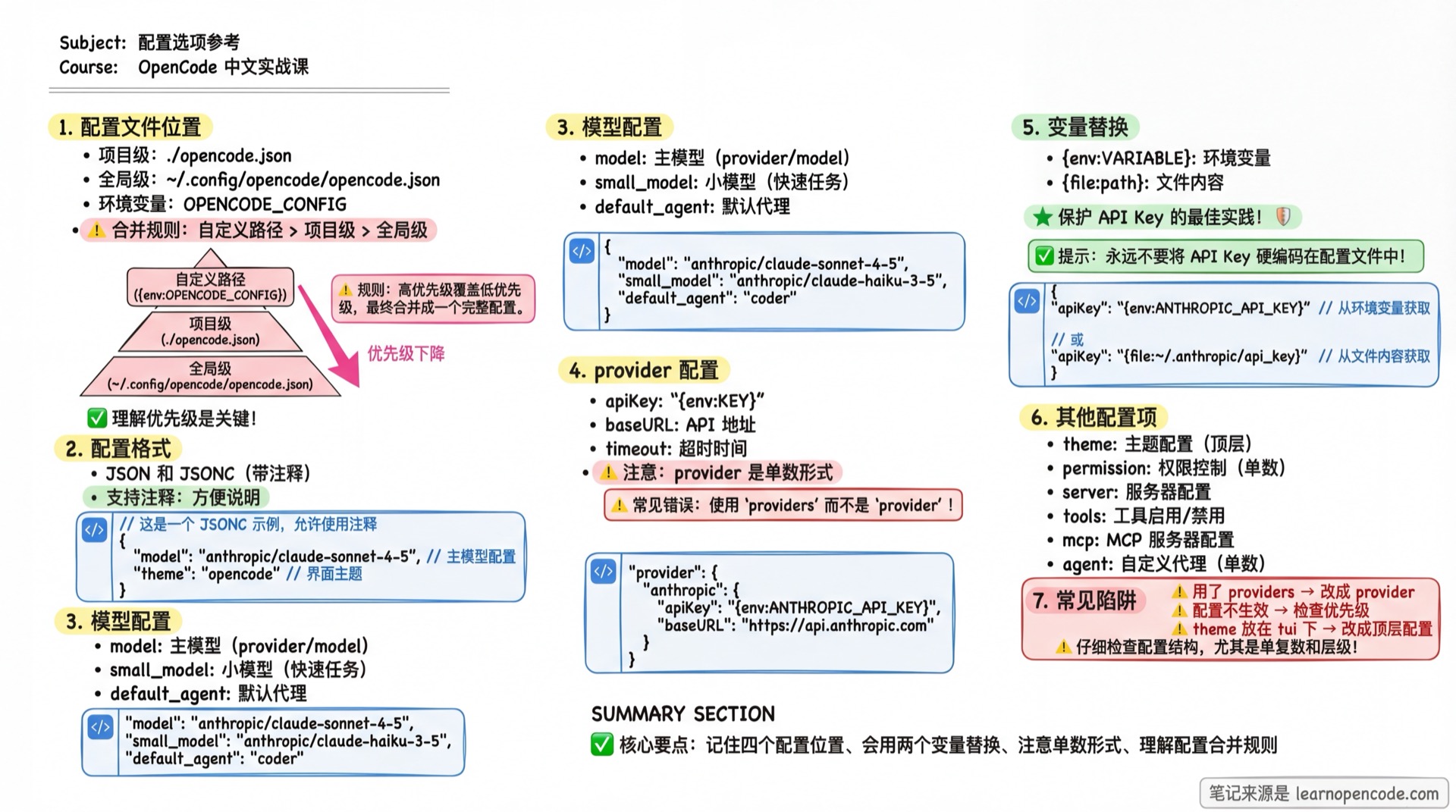
Configuration File Location and Priority
OpenCode loads configuration in the following order (priority from low to high, later overrides earlier):
| Priority | Location | Description |
|---|---|---|
| 1 (lowest) | Remote .well-known/opencode | Remote organization default config (obtained via Auth mechanism) |
| 2 | ~/.config/opencode/opencode.json | Global user configuration |
| 3 | OPENCODE_CONFIG environment variable | Custom configuration file path |
| 4 | ./opencode.json | Project root directory configuration |
| 5 | ./.opencode/opencode.json | Project .opencode directory configuration |
| 6 | OPENCODE_CONFIG_CONTENT environment variable | Inline configuration content (JSON string) |
| 7 (highest) | Managed configuration directory | Enterprise deployment, administrator controlled |
Managed Configuration Directory (enterprise deployment, highest priority):
| Platform | Path |
|---|---|
| macOS | /Library/Application Support/opencode |
| Windows | %ProgramData%\opencode |
| Linux | /etc/opencode |
Top Level Configuration
Fields contained in the root object of the configuration file.
Basic Settings
| Field | Type | Description | Default |
|---|---|---|---|
username | string | Username displayed in conversations. If not set, uses system username. | System user |
autoupdate | boolean | "notify" | Auto-update behavior. true=auto update, false=disabled, "notify"=notify only. | - |
logLevel | enum | Log level. Options: "DEBUG", "INFO", "WARN", "ERROR". | - |
snapshot | boolean | Whether to enable Git snapshot backup mechanism. Set to false to disable. | Enabled when not set |
Model and Agent
| Field | Type | Description |
|---|---|---|
model | string | Primary model ID (format: provider/model), used for complex tasks. |
small_model | string | Small model ID, used for simple tasks like title generation, summaries, etc. |
default_agent | string | Default Primary Agent name to start. Defaults to build. |
Behavior Control
| Field | Type | Description | Default |
|---|---|---|---|
share | enum | Session sharing behavior. "manual", "auto", "disabled". | "manual" |
disabled_providers | string[] | List of disabled providers. Won't load even with API key. | [] |
enabled_providers | string[] | List of only enabled providers. When set, providers not in list are ignored. | - |
TUI Interface Configuration (tui.json)
Terminal interface settings use a standalone tui.json or tui.jsonc. theme, keybinds, and the other interface fields belong directly in the root object. Do not put them in the main opencode.json, and do not wrap them in another tui object.
{
  "$schema": "https://opencode.ai/tui.json",
  "theme": "tokyonight",
  "keybinds": {
    "session_new": "<leader>n"
  },
  "scroll_speed": 3,
  "diff_style": "auto",
  "cursor": {
    "style": "block",
    "blinking": true
  }
}| Field | Type | Description | Default |
|---|---|---|---|
scroll_speed | number | Mouse wheel scroll speed multiplier (minimum 0.001). | 3 |
scroll_acceleration | object | Scroll acceleration configuration. | - |
scroll_acceleration.enabled | boolean | Whether to enable macOS-style inertial scrolling acceleration. | false |
diff_style | enum | Diff display style. "auto"(adaptive), "stacked"(always single column). | "auto" |
theme | string | Interface theme name. See the theme list. | - |
keybinds | object | Keyboard-shortcut overrides, merged with the built-in defaults. | {} |
cursor.style | enum | "block", "underline", "line", or "default". | "block" when cursor is configured |
cursor.blinking | boolean | Whether the cursor blinks; ignored when style is default. | true when cursor is configured |
TUI Configuration Loading Priority
From lowest to highest priority:
- Global
~/.config/opencode/tui.jsonandtui.jsonc - The file specified by
OPENCODE_TUI_CONFIG tui.jsonandtui.jsoncdiscovered from the currently opened directory up to the filesystem root, then applied from the root side back toward the current directory; files closer to the current directory take priority.opencode/tui.jsonandtui.jsoncat each level- Files with the same names in
OPENCODE_CONFIG_DIR
When both extensions exist in one configuration directory, .json is loaded first, followed by .jsonc. Configuration is deep-merged across layers, so project settings can override values from OPENCODE_TUI_CONFIG. Ordinary project files are applied from the root side toward the current directory, so the nearest one wins. Multiple .opencode directories are merged from the current side toward the root, so on conflicts the rootmost directory is loaded later and wins. OPENCODE_CONFIG_DIR is loaded last.
Legacy Configuration Migration Rules
When the TUI starts, it checks old main configuration files directory by directory:
- Migration checks cover the global main configuration, project main configurations discovered upward from the current directory, main configurations in configuration directories, and the file specified by
OPENCODE_CONFIG. - If the target
tui.jsonalready exists in the same directory, migration for that entire directory is skipped. Atui.jsoncalone does not cause it to be skipped. - If the target does not exist, migration recognizes a string-valued
themeand an object-valuedkeybinds. It decodesscroll_speed,scroll_acceleration, anddiff_stylefrom the legacytuiobject against their corresponding schemas during migration, so invalid values are not written to the new, flattui.json. The generated file is also fully schema-validated when loaded. - After the new file has been written successfully, OpenCode creates
<original-main-config>.tui-migration.bak. An existing backup is reused rather than overwritten. - The three legacy fields are removed from the original main configuration only after the backup succeeds. Migration is not transactional: if the new
tui.jsonhas already been written but creating the backup or rewriting the original fails, the destination is not rolled back and the legacy fields may remain. The next launch sees the destination file, skips that directory, and does not retry automatically. - Whether or not migration occurs, the main configuration loader ignores
theme,keybinds, andtui.
Provider Configuration (provider)
Configure model provider API keys, endpoints, and model parameters.
Key name: provider (singular)
Type: Record<string, ProviderConfig>
"provider": {
  "anthropic": {
    "options": {
      "apiKey": "sk-...",
      "timeout": 600000
    }
  }
}
Common Options (options)
options fields supported by all providers:
| Field | Type | Description |
|---|---|---|
apiKey | string | API key. Recommend using {env:VAR} to reference environment variables. |
baseURL | string | Custom API endpoint address (for proxies or compatible services). |
timeout | number | false | Request timeout (milliseconds). Default 300000 (5 minutes). false disables timeout. |
setCacheKey | boolean | Whether to enable Prompt Cache key (for Anthropic/DeepSeek etc.). Default false. |
enterpriseUrl | string | GitHub Enterprise URL (Copilot Provider only). |
Provider-level Fields
The Provider object itself also supports the following fields:
| Field | Type | Description |
|---|---|---|
name | string | Provider display name. |
env | string[] | Environment variable names list (for auto-detecting API key). |
whitelist | string[] | List of only allowed models. |
blacklist | string[] | List of prohibited models. |
Model-specific Configuration (models)
Fine-tune specific models:
"provider": {
  "anthropic": {
    "models": {
      "claude-3-7-sonnet": {
        "variants": {
          "thinking": { "disabled": true }
        }
      }
    }
  }
}
Agent Configuration (agent)
Define or override Agent behavior.
Key name: agent (singular)
Type: Record<string, AgentConfig>
"agent": {
  "code-reviewer": {
    "mode": "subagent",
    "prompt": "You are a code reviewer...",
    "permission": { "edit": "deny" }
  }
}| Field | Type | Description |
|---|---|---|
description | string | Brief description of the Agent, shown in the /agents list and Agent picker. |
mode | enum | Agent type. "primary"(standalone), "subagent", "all". |
model | string | Model ID specific to this Agent. |
variant | string | Default model variant (only effective when using the model configured for this Agent). |
prompt | string | System Prompt (persona instructions). |
temperature | finite number | Temperature coefficient. Its valid range depends on the model and Provider; the OpenCode schema does not impose a universal 0–1 range. |
top_p | finite number | Nucleus sampling parameter. Its valid range depends on the model and Provider; the OpenCode schema does not impose a universal 0–1 range. |
steps | positive integer | Maximum automatic iterations; once reached, the Agent returns a final plain-text response. This counts iterations, not tool calls. |
color | string | Display color in interface (Hex format, e.g. #FF0000), or theme color name (e.g. primary). |
hidden | boolean | Whether to hide this Agent in @ autocomplete menu. |
permission | object | Agent-specific permission configuration (overrides global permissions). |
disable | boolean | Whether to disable this Agent. |
Permission Configuration (permission)
Control OpenCode's access to system resources.
Key name: permission (singular)
Type: Known permission keys are validated according to the two groups below; additional custom permission keys may use Rule
Value can be one of the following strings (Action):
"allow": Auto-allow"ask": Ask each time"deny": Deny
Permission keys that support object rules (Rule) can apply finer-grained control by command or path pattern.
"permission": {
  "edit": "ask",
  "bash": {
    "*": "ask",
    "git *": "allow",
    "rm *": "deny"
  }
}
Supports either Rule or Action:
read,edit,glob,grep,listbash,task,external_directory,lsp,skill
Supports Action only:
todowrite,questionwebfetch,websearch,doom_loop
Additional custom permission keys may use object rules (Rule).
Command Configuration (command)
Define custom slash commands.
Key name: command (singular)
Type: Record<string, CommandConfig>
"command": {
  "commit": {
    "template": "Generate a commit message for these changes:\n$DIFF",
    "agent": "build"
  }
}| Field | Type | Description |
|---|---|---|
template | string | Prompt template. Supports variables like $ARGUMENTS. |
description | string | Command description. |
agent | string | Agent to execute this command. |
model | string | Model to execute this command. |
subtask | boolean | Whether to run as a subtask. |
Keyboard Shortcut Configuration (tui.json → keybinds)
Customize keyboard shortcuts.
Key name: keybinds (plural, at the top level of tui.json)
{
  "$schema": "https://opencode.ai/tui.json",
  "keybinds": {
    "leader": "ctrl+x",
    "session_new": "<leader>n"
  }
}
A binding can be set to "none" or false to disable it. You can also provide one binding or an array of bindings.
Common options (see the keyboard shortcuts reference for the complete list):
leader: Prefix key (defaultctrl+x)app_exit: Exit applicationsession_new: New sessionsession_list: Session listmodel_list: Switch modelagent_list: Switch Agentinput_submit: Send messageinput_newline: New line
Server Configuration (server)
Configure opencode serve or opencode web behavior.
"server": {
  "port": 4096,
  "hostname": "0.0.0.0",
  "mdns": true,
  "mdnsDomain": "opencode.local"
}| Field | Type | Description | Default |
|---|---|---|---|
port | number | Listen port. | 4096 |
hostname | string | Listen address. Defaults to 0.0.0.0 when mdns is enabled. | 127.0.0.1 |
mdns | boolean | Whether to enable mDNS local network discovery. | false |
mdnsDomain | string | Custom domain for mDNS service. | opencode.local |
cors | string[] | List of origins allowed for CORS requests. | - |
Experimental Features (experimental)
Enable experimental features in development. Note: These features are unstable and may change at any time.
"experimental": {
  "batch_tool": true,
  "openTelemetry": true
}| Field | Type | Description |
|---|---|---|
batch_tool | boolean | Enable batch operation tools. |
openTelemetry | boolean | Enable OpenTelemetry tracing. |
disable_paste_summary | boolean | Disable auto-summary when pasting large text. |
continue_loop_on_deny | boolean | Whether to let Agent continue thinking when tool call is denied (instead of interrupting). |
primary_tools | string[] | Specify list of tools only available to Primary Agent. |
mcp_timeout | number | Global timeout for MCP requests (milliseconds). |
Hook functionality is implemented through the plugin system, not
experimentalconfiguration. See Hooks.
Other Configuration
compaction
Control context compression behavior.
"compaction": {
  "auto": true,
  "prune": true,
  "reserved": 10000
}| Field | Type | Description | Default |
|---|---|---|---|
auto | boolean | Auto-trigger compression when context is full. | true |
prune | boolean | Remove old tool outputs during compression. | true |
reserved | number | Token buffer during compression, reserved window to avoid overflow. | - |
watcher
Control file system watching.
"watcher": {
  "ignore": ["node_modules/**", ".git/**"]
}ignore: List of file glob patterns to ignore watching.
instructions
"instructions": ["docs/rules.md", ".cursor/rules/*.md"]List of additional global instruction files.
plugin
"plugin": ["opencode-helicone-session", "./my-plugin.js"]List of plugins to load. Supports npm package names or local file paths.
skills
"skills": {
  "paths": ["./skills", "~/shared-skills"],
  "urls": ["https://example.com/.well-known/skills/"]
}| Field | Type | Description |
|---|---|---|
paths | string[] | Additional Skill folder paths. |
urls | string[] | Remote Skill fetch URLs. |
mcp
Configure Model Context Protocol servers. See the MCP documentation.
formatter
Configure code formatting tools. See the formatter documentation.
lsp
Configure LSP servers. See the LSP documentation.
enterprise
"enterprise": {
  "url": "https://github.example.com"
}
Configure GitHub Enterprise instance URL.
Appendix: Source Code Reference
Click to expand source code locations
Target version: v1.18.22 (commit
47b6b6f5f4f9b42d2bce7af1c4e5bf6efaf22ba7)
| Configuration Area | Pinned Source |
|---|---|
| Main configuration schema | packages/core/src/v1/config/config.ts L32-L190 |
| Main configuration filters legacy TUI fields | packages/opencode/src/config/config.ts L53-L61 |
| TUI schema | packages/tui/src/config/index.tsx L61-L75 |
| Shortcut values and default mappings | packages/tui/src/config/keybind.ts L28-L159 |
| Automatic TUI migration | packages/opencode/src/config/tui-migrate.ts L24-L132 |
| TUI loading hierarchy | packages/opencode/src/config/tui.ts L171-L209 |