

5.10b API Reference
One-line summary: OpenCode SDK provides 20 API modules, one permission-response method, and 32 event types covering sessions, files, configuration, MCP, LSP, and more.
📝 Course Notes
Key takeaways from this lesson:
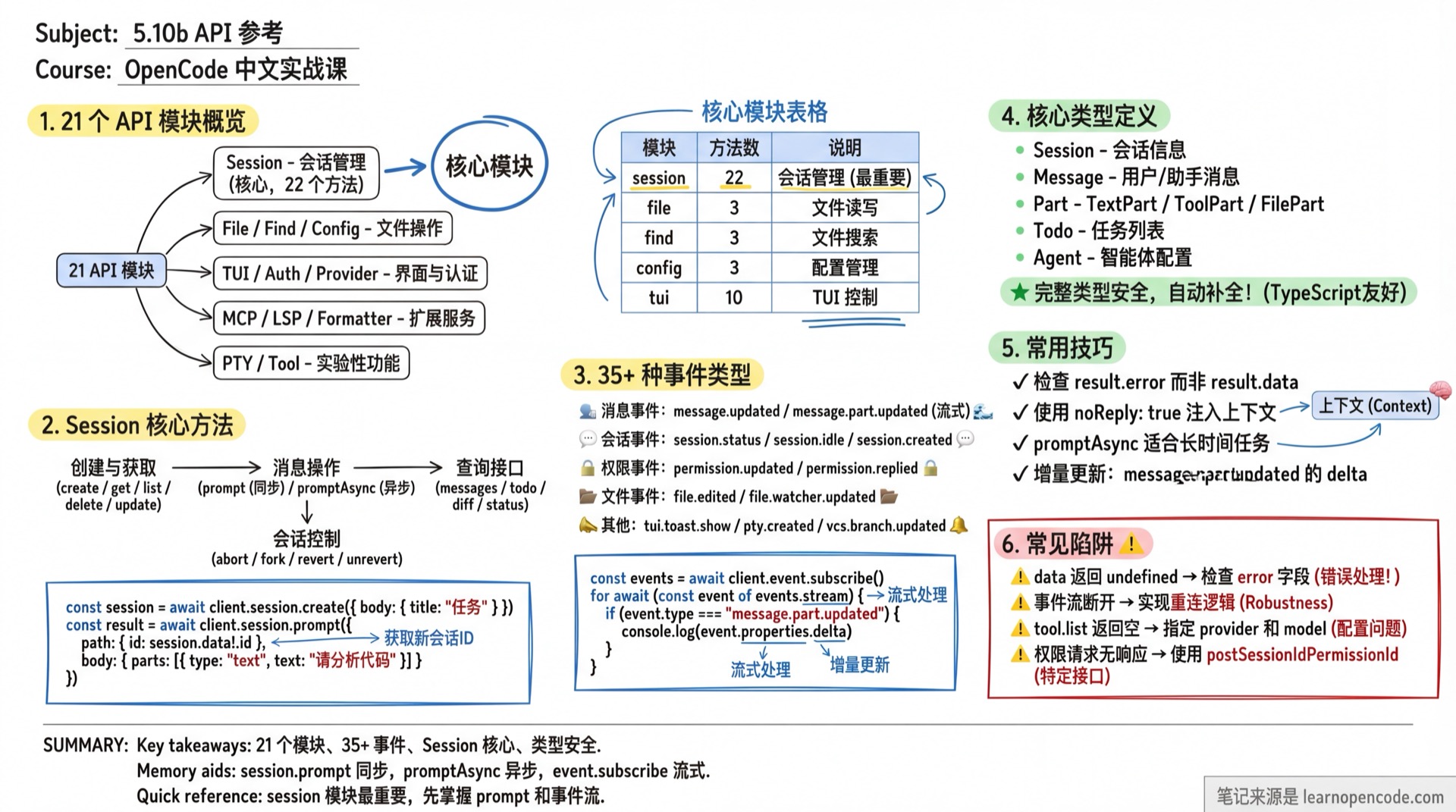
API Module Overview
The SDK client exposes the following modules through the OpencodeClient class:
Version boundary
The tables in this chapter describe the V1 entry point, @opencode-ai/sdk. v1.18.22 continues to export and retain V1 while extending sessions, questions, the current location, event streams, paginated history, runtime operations, and permission requests through @opencode-ai/sdk/v2. Do not mix V2's flat parameters with the V1 { path, body } syntax used in this chapter.
Source:
packages/sdk/js/package.json:12-20,V1 OpencodeClient:1157-1197,V2 Session3:5426-5873
| Module | Description | Source |
|---|---|---|
global | Global event subscription | sdk.gen.ts:233-243 |
project | Project management | sdk.gen.ts:245-265 |
session | Session management (core) | sdk.gen.ts:431-700 |
file | File operations | sdk.gen.ts:808-838 |
find | Search functionality | sdk.gen.ts:776-806 |
config | Configuration management | sdk.gen.ts:337-371 |
app | Application info | sdk.gen.ts:840-864 |
tui | TUI interface control | sdk.gen.ts:1026-1143 |
event | Event subscription | sdk.gen.ts:1145-1155 |
auth | Authentication management | sdk.gen.ts:866-926 |
provider | Model providers | sdk.gen.ts:753-774 |
mcp | MCP server management | sdk.gen.ts:928-974 |
lsp | LSP server status | sdk.gen.ts:976-986 |
formatter | Formatter status | sdk.gen.ts:988-998 |
command | Command list | sdk.gen.ts:703-713 |
path | Path information | sdk.gen.ts:407-417 |
vcs | Version control info | sdk.gen.ts:419-429 |
pty | PTY terminal sessions | sdk.gen.ts:267-335 |
tool | Tool management (experimental) | sdk.gen.ts:373-393 |
instance | Instance management | sdk.gen.ts:395-405 |
Session Management
Sessions are the core module of the SDK, providing message sending, history management, and more.
Method List
| Method | Description | Return Type |
|---|---|---|
session.list() | List all sessions | Session[] |
session.get({ path }) | Get a single session | Session |
session.create({ body }) | Create a new session | Session |
session.delete({ path }) | Delete a session | boolean |
session.update({ path, body }) | Update session properties | Session |
session.status() | Get all session statuses | { [sessionID: string]: SessionStatus } |
session.children({ path }) | Get child session list | Session[] |
session.todo({ path }) | Get session Todo list | Todo[] |
session.init({ path, body }) | Analyze project and create AGENTS.md | boolean |
session.fork({ path, body }) | Fork session at specified message | Session |
session.abort({ path }) | Abort running session | boolean |
session.share({ path }) | Share session | Session |
session.unshare({ path }) | Unshare session | Session |
session.diff({ path }) | Get session file changes | FileDiff[] |
session.summarize({ path, body }) | Summarize session content | boolean |
session.messages({ path }) | Get session message list | {info: Message, parts: Part[]}[] |
session.message({ path }) | Get single message details | {info: Message, parts: Part[]} |
session.prompt({ path, body }) | Send message and wait for response | {info: AssistantMessage, parts: Part[]} |
session.promptAsync({ path, body }) | Send message asynchronously (no wait) | 204 No Content |
session.command({ path, body }) | Send command | {info: AssistantMessage, parts: Part[]} |
session.shell({ path, body }) | Run shell command | AssistantMessage |
session.revert({ path, body }) | Revert to specified message | Session |
session.unrevert({ path }) | Redo the reverted message and file state | Session |
Responding to permission requests
The Session class does not have a permission() method. Respond to permission requests with this direct method on OpencodeClient:
await client.postSessionIdPermissionsPermissionId({
  path: { id: "session-id", permissionID: "perm-id" },
  body: { response: "always" },  // "once" | "always" | "reject"
})
Undo / Revert / Redo
V1's session.revert() performs undo/revert: it moves the session boundary to the specified messageID (optionally narrowed to a partID), collects patches after that boundary, and restores the related file snapshot by default. session.unrevert() performs redo/unrevert: it restores the original snapshot and then clears the revert state. Both reject requests while the session is running.
// Undo: return to a specific message and roll back later file patches by default
await client.session.revert({
  path: { id: sessionID },
  body: { messageID: "msg-123" },
})

// Redo: restore the messages and file state that were just undone
await client.session.unrevert({ path: { id: sessionID } })
Setting snapshot: false disables only file-snapshot undo/redo; it does not remove message-boundary revert support.
Source:
V1 sdk.gen.ts:678-700,session/revert.ts:38-98,config.ts:52-55
Code Example
// Create session
const session = await client.session.create({
  body: { title: "Code Refactoring Task" },
})

// Send message
const result = await client.session.prompt({
  path: { id: session.data!.id },
  body: {
    model: { providerID: "anthropic", modelID: "claude-opus-4-5-thinking" },
    parts: [{ type: "text", text: "Please help me refactor this function" }],
  },
})

// Get message list
const messages = await client.session.messages({
  path: { id: session.data!.id },
})

// Get Todo list
const todos = await client.session.todo({
  path: { id: session.data!.id },
})

// Fork session
const forked = await client.session.fork({
  path: { id: session.data!.id },
  body: { messageID: "msg-123" },
})

// Get file changes
const diff = await client.session.diff({
  path: { id: session.data!.id },
})

// Abort session
await client.session.abort({
  path: { id: session.data!.id },
})

// Share the session (generates an accessible URL)
const shared = await client.session.share({ path: { id: session.data!.id } })
console.log(`Share URL: ${shared.data?.share?.url}`)

// Stop sharing
await client.session.unshare({ path: { id: session.data!.id } })
prompt body Parameters
| Parameter | Type | Description |
|---|---|---|
parts | Array<TextPartInput | FilePartInput | AgentPartInput | SubtaskPartInput> | Message content parts |
model | {providerID, modelID} | Specify model |
noReply | boolean | Set to true to not trigger AI response (inject context) |
agent | string | Use specified Agent |
Token Usage and Cost
Every AI response includes token usage and cost, with no extra request required. The info field returned by session.prompt() (an AssistantMessage) contains cost and tokens:
const result = await client.session.prompt({
  path: { id: sessionID },
  body: {
    parts: [{ type: "text", text: "Analyze this code" }],
  },
})

const info = result.data?.info  // AssistantMessage
if (info) {
  console.log(`Cost: $${info.cost}`)
  console.log(`Input tokens: ${info.tokens.input}`)
  console.log(`Output tokens: ${info.tokens.output}`)
  console.log(`Reasoning tokens: ${info.tokens.reasoning}`)
  console.log(`Cache reads: ${info.tokens.cache.read}`)
  console.log(`Cache writes: ${info.tokens.cache.write}`)
}
Source:
types.gen.ts:112-141(AssistantMessagetype)
Per-step usage: If a model runs multiple steps, such as tool calls, each completed step produces a StepFinishPart with its own cost and tokens, allowing you to measure usage for each step:
// Iterate over every Part in a message and report per-step usage
const msg = await client.session.message({
  path: { id: sessionID, messageID: "msg-1" },
})

for (const part of msg.data?.parts ?? []) {
  if (part.type === "step-finish") {
    console.log(`Step cost: $${part.cost}, output: ${part.tokens.output} tokens`)
  }
}
Source:
types.gen.ts:315-332(StepFinishParttype)
Calculate total usage for an entire session
Iterate over all messages returned by session.messages() and sum the cost and tokens values from each AssistantMessage.
Monitoring Tool Calls
Each ToolPart in an AI response records the complete lifecycle of a tool call. Inspect part.state to identify its current phase and obtain the input, output, and duration:
const msg = await client.session.message({
  path: { id: sessionID, messageID: "msg-1" },
})

for (const part of msg.data?.parts ?? []) {
  if (part.type !== "tool") continue
  console.log(`Tool: ${part.tool}`)
  const state = part.state
  switch (state.status) {
    case "completed":
      console.log(`  Result: ${state.output}`)
      console.log(`  Duration: ${state.time.end - state.time.start}ms`)
      break
    case "error":
      console.log(`  Error: ${state.error}`)
      break
    case "running":
      console.log(`  Running...`)
      break
    case "pending":
      console.log(`  Pending`)
      break
  }
}
The four tool-call states are:
| State | Description | Available Fields |
|---|---|---|
pending | Waiting to run | input (arguments), raw (raw input) |
running | Running | input, title, time.start |
completed | Completed | input, output (result), title, time.{start,end}, attachments |
error | Failed | input, error (error message), time.{start,end} |
Source:
types.gen.ts:237-305(the fourToolStatesubtypes andToolPart)
Session Code-Change Statistics
The Session type includes a summary field that records how much code the session changed, so you do not need to calculate a diff manually:
const session = await client.session.get({ path: { id: sessionID } })
const summary = session.data?.summary
if (summary) {
  console.log(`Files changed: ${summary.files}`)
  console.log(`Lines added: ${summary.additions}`)
  console.log(`Lines deleted: ${summary.deletions}`)
  // summary.diffs contains the diff for each file
}| Field | Type | Description |
|---|---|---|
summary.files | number | Number of files changed |
summary.additions | number | Number of lines added |
summary.deletions | number | Number of lines deleted |
summary.diffs | FileDiff[]? | Per-file diff details |
Source:
types.gen.ts:533-560(Session.summaryfield)
Project Management
| Method | Description | Return Type |
|---|---|---|
project.list() | List all projects | Project[] |
project.current() | Get current project | Project |
// Get current project
const current = await client.project.current()
console.log(`Project path: ${current.data?.worktree}`)

// List all projects
const projects = await client.project.list()
Project Type
type Project = {
  id: string
  worktree: string      // Working directory
  vcsDir?: string       // VCS directory (e.g., .git)
  vcs?: "git"           // Version control type
  time: {
    created: number
    initialized?: number
  }
}
File Operations
| Method | Description | Return Type |
|---|---|---|
file.list({ query }) | List files and directories | FileNode[] |
file.read({ query }) | Read file content | FileContent |
file.status() | Get file status (git changes) | File[] |
// List directory contents
const nodes = await client.file.list({
  query: { path: "src" },
})

// Read file
const content = await client.file.read({
  query: { path: "src/index.ts" },
})
console.log(content.data?.content)

// Get git status
const status = await client.file.status()
for (const file of status.data ?? []) {
  console.log(`${file.status}: ${file.path} (+${file.added}/-${file.removed})`)
}
Find Search Functionality
| Method | Description | Return Type |
|---|---|---|
find.text({ query }) | Search text in file contents | Match result array |
find.files({ query }) | Find files/directories by name | string[] |
find.symbols({ query }) | Find workspace symbols | Symbol[] |
find.files Query Parameters
| Parameter | Type | Description |
|---|---|---|
query | string | Search pattern (supports glob; required) |
dirs | "true" | "false" | Whether to return directories only (string; optional) |
directory | string | Override search root directory (optional) |
// Search text
const matches = await client.find.text({
  query: { pattern: "TODO|FIXME" },
})

// Find files
const tsFiles = await client.find.files({
  query: { query: "*.ts" },
})

// Find directories only
const dirs = await client.find.files({
  query: { query: "src", dirs: "true" },
})

// Find symbols
const symbols = await client.find.symbols({
  query: { query: "handleRequest" },
})
Config Configuration Management
| Method | Description | Return Type |
|---|---|---|
config.get() | Get current configuration | Config |
config.update({ body }) | Update configuration | Config |
config.providers() | Get provider list and default models | {providers, default} |
// Get configuration
const config = await client.config.get()
console.log(`Current model: ${config.data?.model}`)

// Dynamically update configuration
await client.config.update({
  body: {
    model: "anthropic/claude-haiku-4-5",
    logLevel: "DEBUG",
  },
})

// Get provider information
const { providers, default: defaults } = (await client.config.providers()).data!
App Application Info
| Method | Description | Return Type |
|---|---|---|
app.log({ body }) | Write log entry | boolean |
app.agents() | List all Agents | Agent[] |
// Write log
await client.app.log({
  body: {
    service: "my-plugin",
    level: "info",
    message: "Operation complete",
  },
})

// Get Agent list
const agents = await client.app.agents()
for (const agent of agents.data ?? []) {
  console.log(`${agent.name}: ${agent.description}`)
}
TUI Interface Control
| Method | Description | Return Type |
|---|---|---|
tui.appendPrompt({ body }) | Append text to input box | boolean |
tui.submitPrompt() | Submit current input | boolean |
tui.clearPrompt() | Clear input box | boolean |
tui.showToast({ body }) | Show notification | boolean |
tui.openHelp() | Open help dialog | boolean |
tui.openSessions() | Open session selector | boolean |
tui.openThemes() | Open theme selector | boolean |
tui.openModels() | Open model selector | boolean |
tui.executeCommand({ body }) | Execute TUI command | boolean |
tui.publish({ body }) | Publish TUI event | boolean |
tui.control.next() | Get next TUI request | - |
tui.control.response() | Submit TUI response | - |
showToast Parameters
| Parameter | Type | Description |
|---|---|---|
message | string | Notification content |
title | string | Notification title (optional) |
variant | "info" | "success" | "warning" | "error" | Notification type |
duration | number | Display duration (milliseconds) |
// Show success notification
await client.tui.showToast({
  body: {
    title: "Success",
    message: "File saved",
    variant: "success",
    duration: 3000,
  },
})

// Execute command
await client.tui.executeCommand({
  body: { command: "session.new" },
})
Auth Authentication Management
| Method | Description | Return Type |
|---|---|---|
auth.set({ path, body }) | Set authentication credentials | boolean |
auth.remove({ path }) | Remove MCP OAuth credentials | boolean |
auth.start({ path }) | Start OAuth flow | - |
auth.callback({ path, body }) | OAuth callback | - |
auth.authenticate({ path }) | Auto OAuth (open browser) | - |
// Set API Key
await client.auth.set({
  path: { id: "anthropic" },
  body: { type: "api", key: "sk-xxx" },
})

// Set OAuth credentials
await client.auth.set({
  path: { id: "github" },
  body: {
    type: "oauth",
    access: "access-token",
    refresh: "refresh-token",
    expires: Date.now() + 3600000,
  },
})
Provider Management
| Method | Description | Return Type |
|---|---|---|
provider.list() | List all providers | { all: Provider[], default: Record<string, string>, connected: string[] } |
provider.auth() | Get provider authentication methods | Record<string, ProviderAuthMethod[]> |
provider.oauth.authorize({ path, body }) | OAuth authorize | - |
provider.oauth.callback({ path, body }) | OAuth callback | - |
// Get provider list
const providers = await client.provider.list()
for (const p of providers.data?.all ?? []) {
  console.log(`${p.name} (${p.id}): ${Object.keys(p.models).length} models`)
}

// Get authentication methods
const authMethods = await client.provider.auth()
for (const [providerID, methods] of Object.entries(authMethods.data ?? {})) {
  console.log(providerID, methods)
}
MCP Server Management
| Method | Description | Return Type |
|---|---|---|
mcp.status() | Get MCP server status | Record<string, McpStatus> |
mcp.add({ body }) | Dynamically add MCP server | - |
mcp.connect({ path }) | Connect MCP server | - |
mcp.disconnect({ path }) | Disconnect MCP server | - |
mcp.auth.* | MCP OAuth authentication | - |
McpStatus Type
type McpStatus =
  | { status: "connected" }
  | { status: "disabled" }
  | { status: "failed"; error: string }
  | { status: "needs_auth" }
| { status: "needs_client_registration"; error: string }// Get status
const status = await client.mcp.status()
for (const [name, value] of Object.entries(status.data ?? {})) {
console.log(name, value.status)
}
// Dynamically add MCP server
await client.mcp.add({
body: {
name: "my-mcp",
config: {
type: "local",
command: ["node", "mcp-server.js"],
},
},
})
// Connect/disconnect
await client.mcp.connect({ path: { name: "my-mcp" } })
await client.mcp.disconnect({ path: { name: "my-mcp" } })LSP and Formatter Status
// LSP status
const lspStatus = await client.lsp.status()
for (const lsp of lspStatus.data ?? []) {
  console.log(`${lsp.name}: ${lsp.status}`)
}

// Formatter status
const formatterStatus = await client.formatter.status()
for (const fmt of formatterStatus.data ?? []) {
  console.log(`${fmt.name}: ${fmt.enabled ? "enabled" : "disabled"}`)
}
PTY Terminal Sessions
For managing pseudo-terminal sessions (experimental feature).
| Method | Description | Return Type |
|---|---|---|
pty.list() | List all PTY sessions | Pty[] |
pty.create({ body }) | Create PTY session | Pty |
pty.get({ path }) | Get PTY session info | Pty |
pty.update({ path, body }) | Update PTY session | Pty |
pty.remove({ path }) | Remove PTY session | boolean |
pty.connect({ path }) | Connect PTY session | boolean |
Pty Type
type Pty = {
  id: string
  title: string
  command: string
  args: string[]
  cwd: string
  status: "running" | "exited"
  pid: number
}// Create PTY session
const pty = await client.pty.create({
body: {
command: "bash",
cwd: "/home/user/project",
title: "Dev Terminal",
},
})
// Update window size
await client.pty.update({
path: { id: pty.data!.id },
body: {
size: { rows: 24, cols: 80 },
},
})Tool Management (Experimental)
The following APIs are located at
/experimental/path and may change in future versions.
| Method | Description | Return Type |
|---|---|---|
tool.ids() | List all tool IDs | string[] |
tool.list({ query }) | Get tool JSON Schema | ToolListItem[] |
// Get all tool IDs
const toolIds = await client.tool.ids()
console.log("Available tools:", toolIds.data)

// Get tool details (need to specify model)
const tools = await client.tool.list({
  query: {
    provider: "anthropic",
    model: "claude-opus-4-5-thinking",
  },
})
Path and VCS Information
// Get path information
const pathInfo = await client.path.get()
console.log(`State directory: ${pathInfo.data?.state}`)
console.log(`Config directory: ${pathInfo.data?.config}`)
console.log(`Worktree: ${pathInfo.data?.worktree}`)
console.log(`Current directory: ${pathInfo.data?.directory}`)

// Get VCS information
const vcsInfo = await client.vcs.get()
console.log(`Current branch: ${vcsInfo.data?.branch}`)
Instance Management
// Dispose current instance
await client.instance.dispose()
Command List
// Get all commands
const commands = await client.command.list()
for (const cmd of commands.data ?? []) {
  console.log(`/${cmd.name}: ${cmd.description}`)
}
Complete Event Types List
The SDK supports 32 real-time events, subscribable via client.event.subscribe().
Server Events
| Event Type | Description | Properties |
|---|---|---|
server.connected | Server connected | - |
server.instance.disposed | Instance disposed | directory |
Installation Events
| Event Type | Description | Properties |
|---|---|---|
installation.updated | Installation updated | version |
installation.update-available | Update available | version |
Session Events
| Event Type | Description | Properties |
|---|---|---|
session.created | Session created | info: Session |
session.updated | Session updated | info: Session |
session.deleted | Session deleted | info: Session |
session.status | Session status changed | sessionID, status |
session.idle | Session became idle | sessionID |
session.compacted | Session compacted | sessionID |
session.diff | Session file changes | sessionID, diff: FileDiff[] |
session.error | Session error | sessionID?, error |
Message Events
| Event Type | Description | Properties |
|---|---|---|
message.updated | Message updated | info: Message |
message.removed | Message removed | sessionID, messageID |
message.part.updated | Message part updated | part: Part, delta?: string |
message.part.removed | Message part removed | sessionID, messageID, partID |
Permission Events
| Event Type | Description | Properties |
|---|---|---|
permission.updated | Permission request pending | Permission |
permission.replied | Permission responded | sessionID, permissionID, response |
File Events
| Event Type | Description | Properties |
|---|---|---|
file.edited | File edited | file |
file.watcher.updated | File watcher updated | file, event: "add" | "change" | "unlink" |
Todo Events
| Event Type | Description | Properties |
|---|---|---|
todo.updated | Todo list updated | sessionID, todos: Todo[] |
Command Events
| Event Type | Description | Properties |
|---|---|---|
command.executed | Command executed | name, sessionID, arguments, messageID |
VCS Events
| Event Type | Description | Properties |
|---|---|---|
vcs.branch.updated | Branch switched | branch? |
LSP Events
| Event Type | Description | Properties |
|---|---|---|
lsp.updated | LSP status updated | - |
lsp.client.diagnostics | LSP diagnostics | serverID, path |
TUI Events
| Event Type | Description | Properties |
|---|---|---|
tui.prompt.append | Input box text appended | text |
tui.command.execute | TUI command executed | command |
tui.toast.show | Show notification | title?, message, variant, duration? |
PTY Events
| Event Type | Description | Properties |
|---|---|---|
pty.created | PTY session created | info: Pty |
pty.updated | PTY session updated | info: Pty |
pty.exited | PTY session exited | id, exitCode |
pty.deleted | PTY session deleted | id |
Event Listener Example
const events = await client.event.subscribe()

for await (const event of events.stream) {
  switch (event.type) {
    case "message.part.updated":
      // Incremental update, can be used for streaming display
      if (event.properties.delta) {
        process.stdout.write(event.properties.delta)
      }
      break

    case "session.status":
      const { sessionID, status } = event.properties
      if (status.type === "busy") {
        console.log(`Session ${sessionID} processing...`)
      } else if (status.type === "idle") {
        console.log(`Session ${sessionID} completed`)
      } else if (status.type === "retry") {
        console.log(`Session ${sessionID} retrying (${status.attempt})`)
      }
      break

    case "permission.updated":
      console.log(`Permission request: ${event.properties.title}`)
      // Can auto-respond to permission requests
      await client.postSessionIdPermissionsPermissionId({
        path: {
          id: event.properties.sessionID,
          permissionID: event.properties.id,
        },
        body: { response: "always" },  // "once" allows once | "always" always allows | "reject" rejects
      })
      break

    case "file.edited":
      console.log(`File modified: ${event.properties.file}`)
      break

    case "todo.updated":
      console.log(`Todo updated:`, event.properties.todos)
      break
  }
}
Complete Type Definitions
Core Types
// Session
type Session = {
  id: string
  projectID: string
  directory: string
  parentID?: string
  title: string
  version: string
  summary?: {
    additions: number
    deletions: number
    files: number
    diffs?: FileDiff[]
  }
  share?: { url: string }
  time: {
    created: number
    updated: number
    compacting?: number
  }
  revert?: {
    messageID: string
    partID?: string
    snapshot?: string
    diff?: string
  }
}

// Session status
type SessionStatus =
  | { type: "idle" }
  | { type: "busy" }
  | { type: "retry"; attempt: number; message: string; next: number }

// Message
type Message = UserMessage | AssistantMessage

type UserMessage = {
  id: string
  sessionID: string
  role: "user"
  agent: string
  model: { providerID: string; modelID: string }
  time: { created: number }
  summary?: { title?: string; body?: string; diffs: FileDiff[] }
  system?: string
  tools?: { [key: string]: boolean }
}

type AssistantMessage = {
  id: string
  sessionID: string
  role: "assistant"
  parentID: string
  modelID: string
  providerID: string
  mode: string
  path: { cwd: string; root: string }
  time: { created: number; completed?: number }
  error?: MessageError
  cost: number
  tokens: {
    input: number
    output: number
    reasoning: number
    cache: { read: number; write: number }
  }
  finish?: string
  summary?: boolean
}
Part Types
type Part =
  | TextPart
  | ReasoningPart
  | FilePart
  | ToolPart
  | StepStartPart
  | StepFinishPart
  | SnapshotPart
  | PatchPart
  | AgentPart
  | RetryPart
  | CompactionPart
  | SubtaskPart

type TextPart = {
  id: string
  sessionID: string
  messageID: string
  type: "text"
  text: string
  synthetic?: boolean
  ignored?: boolean
  time?: { start: number; end?: number }
  metadata?: { [key: string]: unknown }
}

type ToolPart = {
  id: string
  sessionID: string
  messageID: string
  type: "tool"
  callID: string
  tool: string
  state: ToolState
  metadata?: { [key: string]: unknown }
}

type ToolState =
  | { status: "pending"; input: object; raw: string }
  | { status: "running"; input: object; title?: string; time: { start: number } }
  | { status: "completed"; input: object; output: string; title: string; time: { start: number; end: number } }
  | { status: "error"; input: object; error: string; time: { start: number; end: number } }
Error Types
type MessageError =
  | ProviderAuthError
  | UnknownError
  | MessageOutputLengthError
  | MessageAbortedError
  | ApiError

type ApiError = {
  name: "APIError"
  data: {
    message: string
    statusCode?: number
    isRetryable: boolean
    responseHeaders?: { [key: string]: string }
    responseBody?: string
  }
}
AssistantMessage.error can be one of five types:
| Error Type | Meaning | Common Cause |
|---|---|---|
ProviderAuthError | Authentication failed | API key is invalid or expired |
MessageOutputLengthError | Output too long | The model's maximum output-token limit was exceeded |
MessageAbortedError | Interrupted | The user called session.abort() or the request timed out |
ApiError | API returned an error | Rate limiting (429), server errors (500), and similar failures; inspect data.statusCode and data.isRetryable |
UnknownError | Unknown error | Other unclassified errors |
const result = await client.session.prompt({ path: { id: sessionID }, body: { ... } })
const error = result.data?.info.error
if (error) {
  switch (error.name) {
    case "APIError":
      if (error.data.isRetryable) console.log("Retryable; try again later")
      else console.log(`API error ${error.data.statusCode}: ${error.data.message}`)
      break
    case "ProviderAuthError":
      console.log("API key problem; check the authentication configuration")
      break
    // ...
  }
}
Source:
types.gen.ts:70-110(the fiveMessageErrorsubtypes)
Other Types
type Todo = {
  id: string
  content: string
  status: string  // pending, in_progress, completed, cancelled
  priority: string  // high, medium, low
}

type Permission = {
  id: string
  type: string
  pattern?: string | string[]
  sessionID: string
  messageID: string
  callID?: string
  title: string
  metadata: { [key: string]: unknown }
  time: { created: number }
}

type Agent = {
  name: string
  description?: string
  mode: "subagent" | "primary" | "all"
  builtIn: boolean
  topP?: number
  temperature?: number
  color?: string
  model?: { modelID: string; providerID: string }
  prompt?: string
  tools: { [key: string]: boolean }
  options: { [key: string]: unknown }
  maxSteps?: number
  permission: {
    edit: "ask" | "allow" | "deny"
    bash: { [key: string]: "ask" | "allow" | "deny" }
    webfetch?: "ask" | "allow" | "deny"
    doom_loop?: "ask" | "allow" | "deny"
    external_directory?: "ask" | "allow" | "deny"
  }
}

type FileDiff = {
  file: string
  before: string
  after: string
  additions: number
  deletions: number
}
Common Pitfalls
| Issue | Cause | Solution |
|---|---|---|
data returns undefined | Request failed, check error field | Check result.error |
| Event stream disconnected | Network interruption or server restart | Implement reconnection logic |
tool.list returns empty | Need to specify provider and model | Add query parameters |
| Permission request no response | Need manual response | Use postSessionIdPermissionsPermissionId |
MCP status needs_auth | MCP server requires OAuth authentication | Call mcp.auth.authenticate |
Lesson Summary
You learned:
The complete method list for 20 API modules plus one permission-response method
32 event types and their properties
Core type definitions: Session, Message, Part, Todo, Agent, etc.
Experimental APIs: Tool management, PTY terminal
Next Lesson Preview
We have finished V1, but OpenCode also ships an evolving V2 entry point alongside it. In the next lesson, we cover 5.10c SDK V2: Next-Generation API.
You'll learn:
- Top-level compatibility modules and the
client.v2.*namespace- Standalone Permission and Question modules for managing permissions and questions across sessions
- Enhanced Session3 methods: interrupt, wait, compact, switching models, and switching agents
- New V2 concepts including Sync, Worktree, and Workspace
- A complete guide to migrating from V1 to V2
Related Resources
- 5.10a SDK Basics - Getting started tutorial
- 5.9 Remote Development - HTTP Server details
- SDK Type Definitions Source (v1.18.22)