

5.3a Skill Basics
A Skill is an on-demand loaded domain knowledge package, defined through SKILL.md, that Agents automatically discover and load based on task semantics.
📝 Course Notes
Key concepts from this lesson:
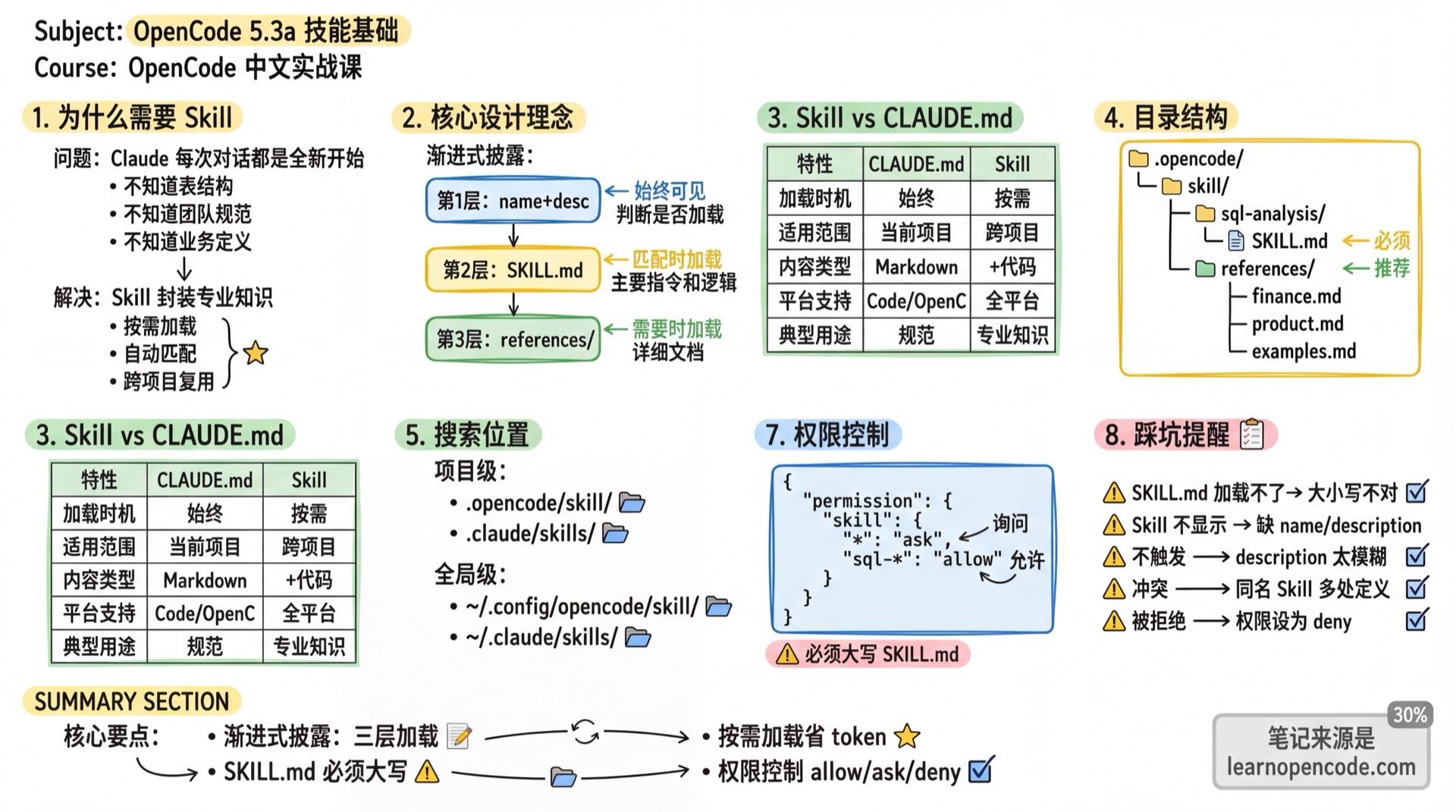
What You'll Learn
- Understand the core design philosophy of Skills
- Create SKILL.md files that follow conventions
- Configure Skill permission controls
- Distinguish between Skill and CLAUDE.md use cases
Why Skills Are Needed
Your Current Problem
User: Help me query revenue data from the data warehouse

Claude: I suggest using this SQL query...
SELECT * FROM revenue WHERE date > '2024-01-01'
Claude provides a generic SQL pattern, but it doesn't know:
- What your table structure looks like
- How "revenue" is defined in your company
- Test accounts must be excluded
- Which summary table should be used
Root Cause: Claude starts fresh with every conversation, lacking your team's domain knowledge.
How Skills Solve This
User: Help me query revenue data from the data warehouse

Claude: [Automatically loads sql-analysis Skill]
I'll help you query revenue data. Based on your data conventions:
- Use the monthly_revenue summary table
- Exclude test accounts (account != 'Test')
- Revenue is calculated as ARR (monthly * 12)

SELECT ...
Skills encapsulate your domain knowledge into resources that Claude can load on demand.
Core Design Philosophy of Skills
Progressive Disclosure
Skills don't stuff everything into context; they use layered loading:
┌─────────────────────────────────────────────────────────┐
│ Layer 1: name + description (~100 words)               │
│ → Always visible, used to determine if loading is needed│
├─────────────────────────────────────────────────────────┤
│ Layer 2: SKILL.md body content                         │
│ → Loaded when task matches, contains main instructions  │
├─────────────────────────────────────────────────────────┤
│ Layer 3: Detailed documents in references/ directory    │
│ → Loaded only when specific details are needed          │
└─────────────────────────────────────────────────────────┘
Why This Design?
Context window is a precious resource. Stuffing all domain knowledge causes:
- Excessive token consumption
- Distracted model attention
- Irrelevant content interfering with output
Progressive disclosure lets Claude load only what's needed for the current task.
Skill vs CLAUDE.md
| Feature | CLAUDE.md | Skill |
|---|---|---|
| Loading Timing | Always loaded to context | Only loaded when task matches |
| Scope | Current project | Reusable across projects |
| Content Type | Pure Markdown | Markdown + code + resource files |
| Platform Support | Claude Code / OpenCode only | Claude.ai / Code / API |
| Typical Use | Project coding conventions, local commands | Domain knowledge, workflows |
Selection Principle:
- Project-specific conventions (code style, branch naming) → CLAUDE.md
- Reusable domain knowledge (data analysis workflows, audit standards) → Skill
Skill Directory Structure
Basic Structure
.opencode/
└── skill/
    └── code-review/
        └── SKILL.md      # Skill definition file (must be uppercase)
Recommended Complete Structure
.opencode/
└── skill/
    └── sql-analysis/
        ├── SKILL.md              # Main file: workflow and key logic
        └── references/           # Detailed documents (loaded on demand)
            ├── finance.md        # Finance table structures
            ├── product.md        # Product table structures
└── examples.md # Query examplesPrinciple: Keep SKILL.md concise, put detailed content in references/, let Claude read it when needed.
OpenCode Search Locations
| Location | Scope | Description |
|---|---|---|
.opencode/skill/<name>/SKILL.md | Current project | Project-specific skills |
~/.config/opencode/skill/<name>/SKILL.md | Global | Available for all projects |
.claude/skills/<name>/SKILL.md | Current project | Claude compatible format |
~/.claude/skills/<name>/SKILL.md | Global | Claude compatible format |
Project paths are traversed from current directory up to git root.
Project References Are Not a Skill's references/
The references/ directory inside a Skill is simply a conventional location for that Skill's own supporting material. The top-level references field in opencode.json is a separate feature: it registers local directories or Git repositories as project context.
{
  "references": {
    "backend": {
      "path": "../backend",
      "description": "Backend service source code"
    },
    "design-system": {
      "repository": "https://github.com/example/design-system.git",
      "branch": "main",
      "description": "Components and design standards",
      "hidden": true
    }
  }
}- Local entries use
path; Git entries userepositoryand may specifybranch. - When
descriptionis present, the reference is included in the system context;hidden: trueonly hides it from@autocomplete in the TUI. - Use the plural key
references. The singularreferenceremains compatible inv1.18.22but is deprecated.
See reference.ts:5-21 for the schema, system.ts:69-92 for system-context injection, and autocomplete.tsx:423-439 for the TUI hiding logic.
Custom Configuration Directory
You can specify additional Skill search paths via the OPENCODE_CONFIG_DIR environment variable:
export OPENCODE_CONFIG_DIR="/path/to/custom/config"OpenCode will scan both:
- Default config directory:
~/.config/opencode/skill/ - Custom config directory:
$OPENCODE_CONFIG_DIR/skill/
This is useful for team-shared Skills or using different Skill sets in different environments.
In v1.18.22, OpenCode retrieves every configuration directory from the configuration service, then scans each one for {skill,skills}/**/SKILL.md files. See skill/index.ts:205-208.
Nested Directory Support
OpenCode supports nested Skill directories:
.opencode/
└── skill/
    └── audit/
        └── security/
            └── SKILL.md    # Skill name determined by frontmatter name field
Source: skill/index.ts:21-25
const OPENCODE_SKILL_PATTERN = "{skill,skills}/**/SKILL.md"The ** means matching subdirectories at any depth.
Built-in customize-opencode Skill
v1.18.22 registers customize-opencode by default for modifying OpenCode's own configuration, Agents, Skills, plugins, MCP servers, and permissions. It is registered before Skills found on disk, so a local Skill with the same name can override the built-in version. See skill/index.ts:27-35 and skill/index.ts:276-284.
Scout Is Historical, Not a Current Agent
Scout was introduced briefly within this synchronization range but removed in v1.16.0. Do not continue to depend on Scout in Agent lists or workflows for v1.18.22; use the Agents and tools currently available when exploring a codebase.
SKILL.md Format
Required Frontmatter
---
name: "sql-analysis"
description: "Used for analyzing business data: revenue, ARR, customer segmentation, product usage, sales pipeline. Provides table structures, metric definitions, required filters, and query patterns."
---| Field | Required | Description |
|---|---|---|
name | Yes | Skill identifier, used for invocation |
description | Yes | Trigger condition description (most important!) |
license | No | License information |
compatibility | No | Compatibility markers |
metadata | No | Custom key-value pairs |
name Naming Convention
Official recommendations (source doesn't enforce, but following ensures compatibility):
✓ code-review
✓ sql-analysis
✓ git-release
✗ Code_Review    ← Don't use uppercase
✗ sql--analysis  ← Don't use consecutive hyphens
✗ -review        ← Don't start with hyphen
Regex reference: ^[a-z0-9]+(-[a-z0-9]+)*$
description Writing (Key to Triggering)
description is the sole factor determining whether a Skill triggers. Claude uses semantic understanding (not keyword matching) to judge if a task needs a certain Skill.
Poor Example:
description: "Help with documents"Problem: Too vague, AI can't determine when to trigger.
Good Example:
description: |
  Extract tables from PDFs and convert to CSV format for data analysis workflows.
  Suitable for: filling PDF forms, batch processing PDF documents, extracting embedded PDF data.
  Not suitable for: simple PDF viewing, basic format conversion, PDF editing.
description Writing Template:
description: |
  [One sentence explaining core capability]
  Provides: [resources this Skill contains, like table structures, formulas, templates]
  Suitable for: [trigger scenario 1], [trigger scenario 2], [trigger scenario 3]
  Not suitable for: [boundary scenario 1], [boundary scenario 2]
description Elements:
- Specific Capability: What it can do (extract tables, convert formats)
- Provided Resources: What it contains (table structures, formulas, templates)
- Trigger Scenarios: When to use (batch processing, form filling)
- Boundary Constraints: When not to use (simple viewing)
Complete Example
---
name: "sql-analysis"
description: |
  Used for analyzing business data: revenue trends, ARR calculation, customer segmentation, product usage, sales pipeline.
  Provides: company table structures, metric definition formulas, standard filters, common query templates.
  Suitable for: writing SQL to analyze business data, understanding company metric definitions, querying data warehouse.
  Not suitable for: database administration, DDL operations, performance tuning, general SQL education.
---

# SQL Analysis Skill

## Quick Workflow

When user requests data analysis:

1. **Clarify Requirements**
   - What time range? (Default: current year)
   - Which customer segment?
   - What decision is this analysis for?

2. **Check Existing Dashboards**
   - See if `references/dashboards.md` has ready-made reports
   - If yes, prioritize guiding user to use them

3. **Determine Data Source**
   - Prefer summary tables over raw event data
   - Confirm table has required fields before querying

4. **Execute Analysis**
   - Apply required filters (exclude test accounts, etc.)
   - Validate results against known baselines

## Standard Query Filters

All revenue queries must:
- Exclude test accounts: `WHERE account != 'Test'`
- Use only complete periods: `WHERE month <= DATE_TRUNC(CURRENT_DATE(), MONTH)`

## ARR Calculation Method

- Monthly to ARR: `monthly_revenue * 12`
- 7-day run rate: `rolling_7d * 52`

## Detailed Documentation

When table structures and query patterns are needed, refer to:
- **Revenue & Finance** → `references/finance.md`
- **Product Usage** → `references/product.md`
- **Sales Pipeline** → `references/sales.md`
Note: SKILL.md only contains workflow and key logic; detailed table structures go in the references/ directory.
How Skills Are Discovered and Loaded
Discovery Mechanism
At startup, OpenCode scans all Skills and aggregates name and description into the skill tool description:
<available_skills>
  <skill>
    <name>sql-analysis</name>
    <description>Used for analyzing business data: revenue, ARR, customer segmentation...</description>
  </skill>
  <skill>
    <name>code-review</name>
    <description>Perform code review, check conventions, bugs, performance and security</description>
  </skill>
</available_skills>
Loading Mechanism
When user sends a message, Claude determines whether to load a Skill based on semantics:
User message: Help me analyze last quarter's revenue data

Claude determines: This is a data analysis task, matches sql-analysis Skill

Claude invokes: skill({ name: "sql-analysis" })

Result: SKILL.md content loaded to context
Output After Loading
## Skill: sql-analysis

**Base directory**: /path/to/.opencode/skill/sql-analysis

[SKILL.md content]
The Base directory information tells Claude how to access relative path files in references/.
Permission Configuration
Global Permissions
Configure in opencode.json:
{
  "permission": {
    "skill": {
      "pr-review": "allow",        // Load immediately
      "internal-*": "deny",        // Hidden, access denied
      "experimental-*": "ask",     // Ask user before loading
      "*": "allow"                 // Default allow others
    }
  }
}| Permission Value | Behavior |
|---|---|
allow | Skill loads immediately |
deny | Skill hidden from Agent, access denied |
ask | Prompt user confirmation before loading |
Wildcards supported:
internal-*matchesinternal-docs,internal-tools, etc.
Override Permissions per Agent
In Markdown Agent:
---
permission:
  skill:
    "documents-*": "allow"
---
In opencode.json:
{
  "agent": {
    "plan": {
      "permission": {
        "skill": {
          "internal-*": "allow"
        }
      }
    }
  }
}
Disable Skill Tool
For Agents that don't need Skills, you can completely disable:
Markdown Method:
---
tools:
  skill: false
---
JSON Method:
{
  "agent": {
    "plan": {
      "tools": {
        "skill": false
      }
    }
  }
}
When disabled, <available_skills> section won't appear in that Agent's tool description at all.
Simple Examples
Translation Skill
---
name: "translate"
description: "Professional translation, preserving format and terminology. Used for translating technical documentation, API docs, code comments."
---

# Translation Skill

## Translation Standards

1. Preserve original format and paragraph structure
2. Keep proper nouns in original with annotation
3. Check terminology table for technical terms
4. Proofread after translation

## Output Format

Wrap translation result in code block:
For uncertain translations, annotate original in parentheses.Brand Guidelines Skill
---
name: "brand-guidelines"
description: "Apply official company brand colors and typography standards when creating documents, presentations, or interface designs that require the company's visual style."
---

# Brand Guidelines Skill

## Colors

**Primary Colors**:
- Dark: `#141413` - Main text and dark backgrounds
- Light: `#faf9f5` - Light backgrounds and text on dark
- Medium Gray: `#b0aea5` - Secondary elements

**Accent Colors**:
- Orange: `#d97757` - Primary accent
- Blue: `#6a9bcc` - Secondary accent
- Green: `#788c5d` - Tertiary accent

## Typography

- **Headings**: Poppins (fallback Arial)
- **Body**: Lora (fallback Georgia)

## Application Rules

- Use Poppins for headings (24pt and above)
- Use Lora for body text
- Intelligently select text color based on background
Common Pitfalls
| Issue | Cause | Solution |
|---|---|---|
| Skill won't load | SKILL.md case incorrect | Must be uppercase SKILL.md |
| Skill not showing | Missing frontmatter fields | Must include name and description |
| Task matches but doesn't trigger | description too vague | Add specific capabilities, scenarios, boundaries |
| Same-name Skill conflict | Same name defined in multiple places | Later loaded overwrites earlier, check log warnings |
| Access denied | Permission set to deny | Check permission configuration |
| Skill directory not recognized | Directory spelling issue | Both skill/ and skills/ supported |
Lesson Summary
You learned:
- Skill Core Concept: Progressive disclosure, on-demand loading
- Directory Structure:
skill/<name>/SKILL.md+references/ - SKILL.md Format: name and description required
- description Writing: Specific capability + trigger scenarios + boundary constraints
- Permission Control: allow/ask/deny + wildcards
- Skill vs CLAUDE.md: On-demand loading vs always loaded
Next Lesson Preview
Next lesson dives into advanced Skill usage: progressive disclosure three-layer structure, executable scripts, creation workflow, testing validation, and real-world examples.