

5.9b HTTP API Reference
💡 One-line summary: OpenCode server provides a complete REST API for programmatic interaction with OpenCode.
📝 Course Notes
Key concepts from this lesson:
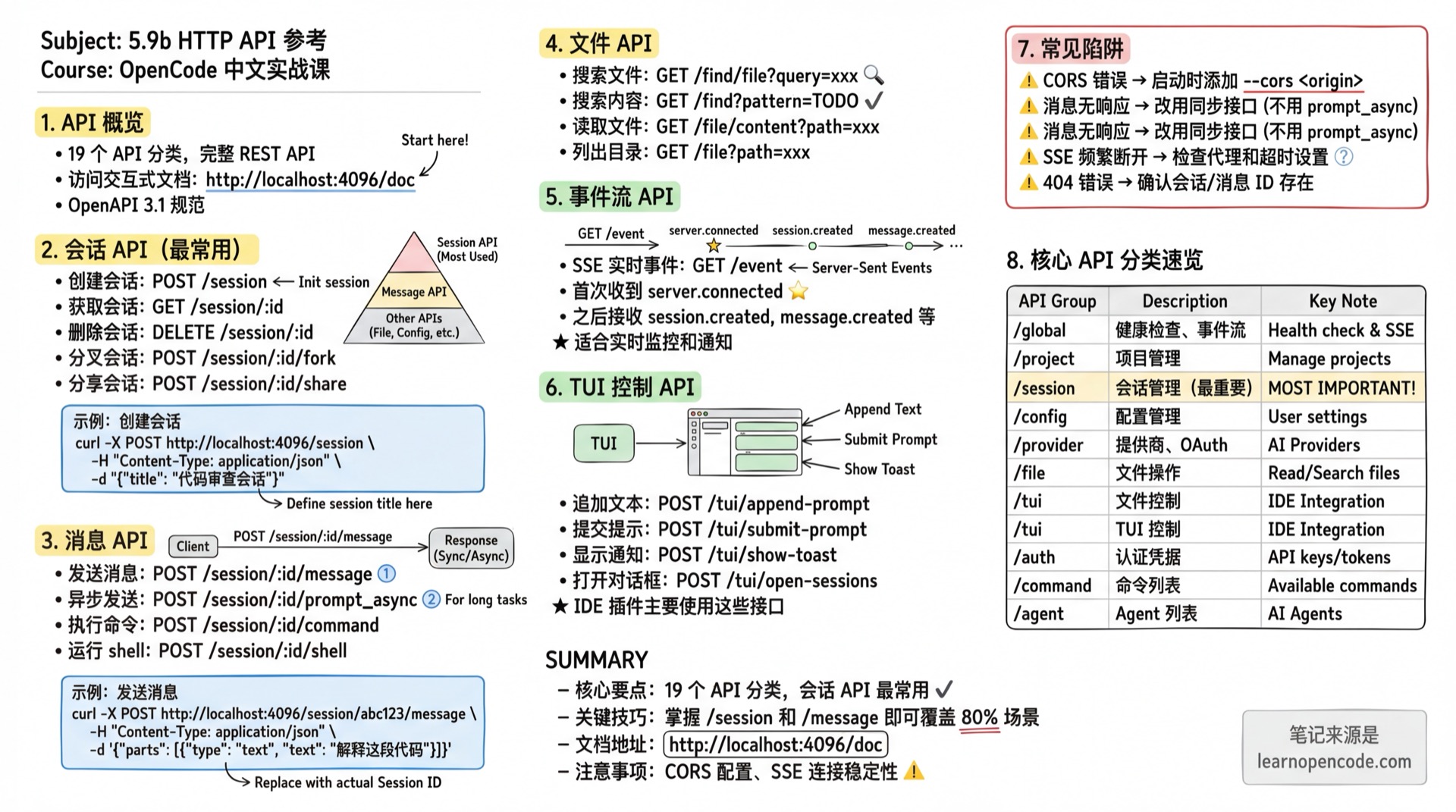
What You'll Learn
- Understand the overall structure of OpenCode API
- Manage sessions and messages using the API
- Execute commands and operate files via API
- Listen to SSE event streams
API Overview
OpenCode server publishes an OpenAPI 3.1 specification, viewable with interactive documentation at:
http://<hostname>:<port>/docExample: http://localhost:4096/doc
Most of the /session, /file, and /event paths covered below belong to the V1 API. v1.18.22 retains V1 while extending V2 through /api/*; upgrading does not automatically convert existing V1 calls to V2.
Source:
packages/sdk/js/package.json:12-20,V1 sdk.gen.ts:431-700,V2 sdk.gen.ts:5426-5873
V2 API Extensions
V2 is more than a model catalog. In the target version, it extends sessions, questions, the current location, event streams, paginated history, runtime operations, and permission requests:
| Method | Path | Description |
|---|---|---|
GET | /api/location | Resolve the current directory/workspace location |
GET / POST | /api/session | List sessions with pagination / create a session |
GET | /api/session/:sessionID | Get a session |
GET | /api/session/:sessionID/history | Read a bounded page of events using after and limit |
GET | /api/session/:sessionID/event | Replay and then continuously subscribe to events for the session |
POST | /api/session/:sessionID/interrupt | Interrupt an active execution owned by the current process |
GET | /api/session/:sessionID/question | List pending questions for the session |
POST | /api/session/:sessionID/question/:requestID/reply | Answer a pending question |
POST | /api/session/:sessionID/question/:requestID/reject | Reject a pending question |
GET / POST | /api/session/:sessionID/permission | List or create session-level permission requests |
GET | /api/permission/request | List pending permission requests by location |
GET | /api/event | V2 server-event SSE stream |
Source:
sdk.gen.ts:5038-5058,sdk.gen.ts:5171-5424,sdk.gen.ts:5426-5793,sdk.gen.ts:6319-6405,sdk.gen.ts:6549-6559
Authentication
If the server has OPENCODE_SERVER_PASSWORD environment variable set, all API requests require HTTP Basic Auth authentication.
curl Example
# With Basic Auth
curl -u opencode:your-password http://localhost:4096/global/health

# Or manually set Authorization header
curl -H "Authorization: Basic $(echo -n 'opencode:your-password' | base64)" \
  http://localhost:4096/global/health
Authentication Parameters
| Parameter | Description |
|---|---|
| Username | Default opencode, or value of OPENCODE_SERVER_USERNAME environment variable |
| Password | Value of OPENCODE_SERVER_PASSWORD environment variable |
Global API
/global
| Method | Path | Description | Response |
|---|---|---|---|
GET | /global/health | Server health status | { healthy: true, version: string } |
GET | /global/event | Global event stream (SSE) | Event stream |
Example:
# No authentication is required when no server password is configured
curl http://localhost:4096/global/health

# After configuring OPENCODE_SERVER_PASSWORD, health also requires Basic Auth
curl -u opencode:your-password http://localhost:4096/global/health
Response:
{
  "healthy": true,
  "version": "1.0.48"
}
Source:
opencode/packages/opencode/src/server/server.ts:131-150
Project API
/project
| Method | Path | Description | Response |
|---|---|---|---|
GET | /project | List all projects | Project[] |
GET | /project/current | Get current project | Project |
Source:
opencode/packages/web/src/content/docs/server.mdx:88-94
Path & Version Control API
/path, /vcs
| Method | Path | Description | Response |
|---|---|---|---|
GET | /path | Get current path | Path |
GET | /vcs | Get VCS info for current project | VcsInfo |
Source:
opencode/packages/web/src/content/docs/server.mdx:97-103
Instance API
/instance
| Method | Path | Description | Response |
|---|---|---|---|
POST | /instance/dispose | Destroy current instance | boolean |
Source:
opencode/packages/web/src/content/docs/server.mdx:106-111
Configuration API
/config
| Method | Path | Description | Response |
|---|---|---|---|
GET | /config | Get configuration info | Config |
PATCH | /config | Update configuration | Config |
GET | /config/providers | List providers and default models | { providers: Provider[], default: Record<string, string> } |
Source:
opencode/packages/web/src/content/docs/server.mdx:114-121
Provider API
/provider
| Method | Path | Description | Response |
|---|---|---|---|
GET | /provider | List all providers | { all: Provider[], default: {...}, connected: string[] } |
GET | /provider/auth | Get provider auth methods | { [providerID: string]: ProviderAuthMethod[] } |
POST | /provider/{id}/oauth/authorize | Initiate OAuth authorization | ProviderAuthAuthorization |
POST | /provider/{id}/oauth/callback | Handle OAuth callback | boolean |
Source:
opencode/packages/web/src/content/docs/server.mdx:124-132
Session API
/session
This is the most commonly used API for managing conversation sessions.
| Method | Path | Description | Notes |
|---|---|---|---|
GET | /session | List all sessions | Returns Session[] |
POST | /session | Create new session | body: { parentID?, title? } |
GET | /session/status | Get all session statuses | { [sessionID: string]: SessionStatus } |
GET | /session/:id | Get session details | Returns Session |
DELETE | /session/:id | Delete session and its data | Returns boolean |
PATCH | /session/:id | Update session properties | body: { title? } |
GET | /session/:id/children | Get child sessions | Returns Session[] |
GET | /session/:id/todo | Get session todo list | Returns Todo[] |
POST | /session/:id/init | Analyze app and create AGENTS.md | body: { messageID, providerID, modelID } |
POST | /session/:id/fork | Fork session from specified message | body: { messageID? } |
POST | /session/:id/abort | Abort running session | Returns boolean |
POST | /session/:id/share | Share session | Returns Session |
DELETE | /session/:id/share | Unshare session | Returns Session |
GET | /session/:id/diff | Get session file diff | query: messageID? |
POST | /session/:id/summarize | Summarize session | body: { providerID, modelID } |
POST | /session/:id/revert | Undo to a specific message/part and roll back related file patches by default | body: { messageID, partID? } |
POST | /session/:id/unrevert | Redo the reverted message and file state | Returns Session |
POST | /session/:id/permissions/:permissionID | Respond to permission request | body: { response } |
Source:
opencode/packages/web/src/content/docs/server.mdx:135-157
revert does more than hide chat messages: the service locates the target boundary, collects subsequent patches, restores the snapshot, and updates the session diff. unrevert restores the original snapshot and clears the revert state. Both operations require the session to be idle. Setting snapshot: false disables only file-snapshot undo/redo; message-boundary revert semantics remain available.
Source:
session/revert.ts:38-98,config.ts:52-55,V1 sdk.gen.ts:678-700
Example - Create new session:
curl -X POST http://localhost:4096/session \
  -H "Content-Type: application/json" \
  -d '{"title": "Code Review Session"}'
Workspace API (Experimental)
In v1.18.22, workspaces are adapter-driven. The built-in adapter is worktree, and the API can list adapters, create or discover workspaces, inspect connection status, and warp sessions. Requests can use the directory / workspace query parameters for workspace-aware routing; warp with copyChanges copies the Git patch.
| Method | Path | Description |
|---|---|---|
GET | /experimental/workspace/adapter | List adapters available to the current project |
GET / POST | /experimental/workspace | List / create workspaces |
POST | /experimental/workspace/sync-list | Register workspaces discovered by an adapter but not yet recorded |
GET | /experimental/workspace/status | Get connection status |
POST | /experimental/workspace/warp | Move a session, optionally with copyChanges |
Historical boundary
The v1.16.0 release promised that managed workspace cloning would preserve dirty and untracked files. In the target tag, the current implementation has moved to the adapter/worktree path. That historical capability must not be treated as current v1.18.22 API behavior: the implementation evidence for copyChanges is a Git patch, with no promise to copy all untracked files.
Current implementation:
workspace API paths:12-47,workspace API endpoints:53-127,workspace.ts:492-538,workspace.ts:559-620,workspace-routing.ts:148-185. Historical evidence:v1.16.0 Release, commit5661af203487b90cf9ee0844b198b03cce26c412.
Message API
/session/:id/message
| Method | Path | Description | Notes |
|---|---|---|---|
GET | /session/:id/message | List messages | query: limit? |
POST | /session/:id/message | Send message and wait for response | see body below |
GET | /session/:id/message/:messageID | Get message details | Returns { info, parts } |
POST | /session/:id/prompt_async | Send message asynchronously (no wait) | Returns 204 No Content |
POST | /session/:id/command | Execute slash command | body: { command, arguments, ... } |
POST | /session/:id/shell | Run shell command | body: { agent, model?, command } |
Send Message Request Body
{
  messageID?: string,     // Optional, message ID
  model?: {               // Optional, specify model
    providerID: string,
    modelID: string
  },
  agent?: string,         // Optional, specify agent
  noReply?: boolean,      // Optional, don't wait for reply
  system?: string,        // Optional, system prompt
  tools?: Record<string, boolean>, // Deprecated; prefer permission configuration
  parts: Part[]           // Message content
}
Source:
opencode/packages/web/src/content/docs/server.mdx:160-170
Example - Send message:
curl -X POST http://localhost:4096/session/abc123/message \
  -H "Content-Type: application/json" \
  -d '{
    "parts": [
      {"type": "text", "text": "Explain what this code does"}
    ]
  }'
Command API
/command
| Method | Path | Description | Response |
|---|---|---|---|
GET | /command | List all commands | Command[] |
Source:
opencode/packages/web/src/content/docs/server.mdx:173-178
File API
/find, /file
| Method | Path | Description | Response |
|---|---|---|---|
GET | /find?pattern=<pat> | Search file contents | Array of matches |
GET | /find/file?query=<q> | Find files by name | string[] (paths) |
GET | /find/symbol?query=<q> | Find workspace symbols | Symbol[] |
GET | /file?path=<path> | List directory contents | FileNode[] |
GET | /file/content?path=<p> | Read file content | FileContent |
GET | /file/status | Get tracked file status | File[] |
/find/file Query Parameters
| Parameter | Required | Description |
|---|---|---|
query | Yes | Search string (fuzzy match) |
type | No | Limit to "file" or "directory" |
directory | No | Override project root directory |
limit | No | Max results (1-200) |
dirs | No | Legacy parameter, "false" for files only |
Source:
opencode/packages/web/src/content/docs/server.mdx:181-199
Example - Search files:
# Search for files with "config" in the name
curl "http://localhost:4096/find/file?query=config&limit=10"

# Search file contents
curl "http://localhost:4096/find?pattern=TODO"
Tool API (Experimental)
/experimental/tool
| Method | Path | Description | Response |
|---|---|---|---|
GET | /experimental/tool/ids | List all tool IDs | ToolIDs |
GET | /experimental/tool?provider=<p>&model=<m> | Get available tools and JSON Schema for model | ToolList |
Source:
opencode/packages/web/src/content/docs/server.mdx:202-208
LSP, Formatter & MCP API
/lsp, /formatter, /mcp
| Method | Path | Description | Response |
|---|---|---|---|
GET | /lsp | Get LSP server status | LSPStatus[] |
GET | /formatter | Get formatter status | FormatterStatus[] |
GET | /mcp | Get MCP server status | { [name: string]: MCPStatus } |
POST | /mcp | Dynamically add MCP server | body: { name, config } |
POST | /mcp/:name/auth | Start MCP OAuth authentication | { authorizationUrl: string } |
POST | /mcp/:name/auth/callback | Handle MCP OAuth callback | boolean |
Source:
opencode/packages/web/src/content/docs/server.mdx:211-218,server.ts:2197-2230
Agent API
/agent
| Method | Path | Description | Response |
|---|---|---|---|
GET | /agent | List all available agents | Agent[] |
Source:
opencode/packages/web/src/content/docs/server.mdx:222-227
Log API
/log
| Method | Path | Description | Response |
|---|---|---|---|
POST | /log | Write log entry | boolean |
Request body:
{
  service: string,           // Service name
  level: "debug" | "info" | "warn" | "error",
  message: string,           // Log message
  extra?: Record<string, any> // Additional metadata
}
Source:
opencode/packages/web/src/content/docs/server.mdx:230-235
TUI Control API
/tui
Used for remote control of the TUI interface, primarily used by IDE plugins.
| Method | Path | Description | Response |
|---|---|---|---|
POST | /tui/append-prompt | Append text to prompt box | boolean |
POST | /tui/open-help | Open help dialog | boolean |
POST | /tui/open-sessions | Open session selector | boolean |
POST | /tui/open-themes | Open theme selector | boolean |
POST | /tui/open-models | Open model selector | boolean |
POST | /tui/submit-prompt | Submit current prompt | boolean |
POST | /tui/clear-prompt | Clear prompt box | boolean |
POST | /tui/execute-command | Execute command | body: { command } |
POST | /tui/show-toast | Show toast notification | body: { title?, message, variant } |
GET | /tui/control/next | Wait for next control request | Control request object |
POST | /tui/control/response | Respond to control request | body: { body } |
Source:
opencode/packages/web/src/content/docs/server.mdx:238-253
Example - Remote control TUI:
# Add text to prompt box
curl -X POST http://localhost:4096/tui/append-prompt \
  -H "Content-Type: application/json" \
  -d '{"text": "Please help me review this code"}'

# Submit prompt
curl -X POST http://localhost:4096/tui/submit-prompt

# Show notification
curl -X POST http://localhost:4096/tui/show-toast \
  -H "Content-Type: application/json" \
  -d '{"message": "Operation complete", "variant": "success"}'
Authentication API
/auth
| Method | Path | Description | Response |
|---|---|---|---|
PUT | /auth/:id | Set authentication credentials | boolean |
Request body must match the corresponding provider's schema.
Source:
opencode/packages/web/src/content/docs/server.mdx:256-261
Event Stream API
/event
| Method | Path | Description | Response |
|---|---|---|---|
GET | /event | SSE event stream | Server-sent events |
Upon connection, you first receive a server.connected event, followed by various bus events.
Source:
opencode/packages/web/src/content/docs/server.mdx:264-269
Example - Listen to events:
curl -N http://localhost:4096/eventOutput example:
event: server.connected
data: {}

event: session.created
data: {"id":"abc123","title":"New Session"}

event: message.created
data: {"sessionID":"abc123","content":"..."}
API Documentation
/doc
| Method | Path | Description | Response |
|---|---|---|---|
GET | /doc | OpenAPI 3.1 specification docs | HTML page |
Source:
opencode/packages/web/src/content/docs/server.mdx:272-277
Type Definitions
Complete TypeScript type definitions can be found in the SDK:
https://github.com/anomalyco/opencode/blob/v1.18.22/packages/sdk/js/src/gen/types.gen.tsCommon types:
Session- Session infoMessage- Message infoPart- Message content partProvider- Provider infoAgent- Agent infoConfig- Configuration info
Common Pitfalls
| Issue | Cause | Solution |
|---|---|---|
| Request returns CORS error | Client origin not whitelisted | Add --cors <origin> when starting |
| No response after sending message | Used prompt_async | Use synchronous /session/:id/message instead |
| SSE connection drops frequently | Network timeout or proxy issues | Check proxy settings, increase timeout |
| 404 error | Session or message ID doesn't exist | Verify resource exists via GET endpoint first |
| Experimental API unavailable | Feature may change or be removed | Check latest docs to confirm |
Lesson Summary
You learned:
- API Structure: 19 API categories covering sessions, messages, files, tools, etc.
- Session Management: Create, query, fork, and share sessions
- Message Interaction: Send messages synchronously/asynchronously, execute commands
- File Operations: Search, read, and list files
- TUI Control: Remote control of TUI interface
- Event Listening: Receive real-time events via SSE
Related Resources
- 5.9a Remote Mode Basics - Server startup and remote connection
- 5.10 SDK - JavaScript/TypeScript SDK
- Official API Docs - Complete English documentation
Next Lesson Preview
In the next lesson, we'll learn how to develop using the SDK.