

Enterprise Authentication Integration
💡 One-liner: Connect your company's unified login token to OpenCode, so your team doesn't need to manually enter keys and can use internal models by default.
📝 Course Notes
Key takeaways from this lesson:
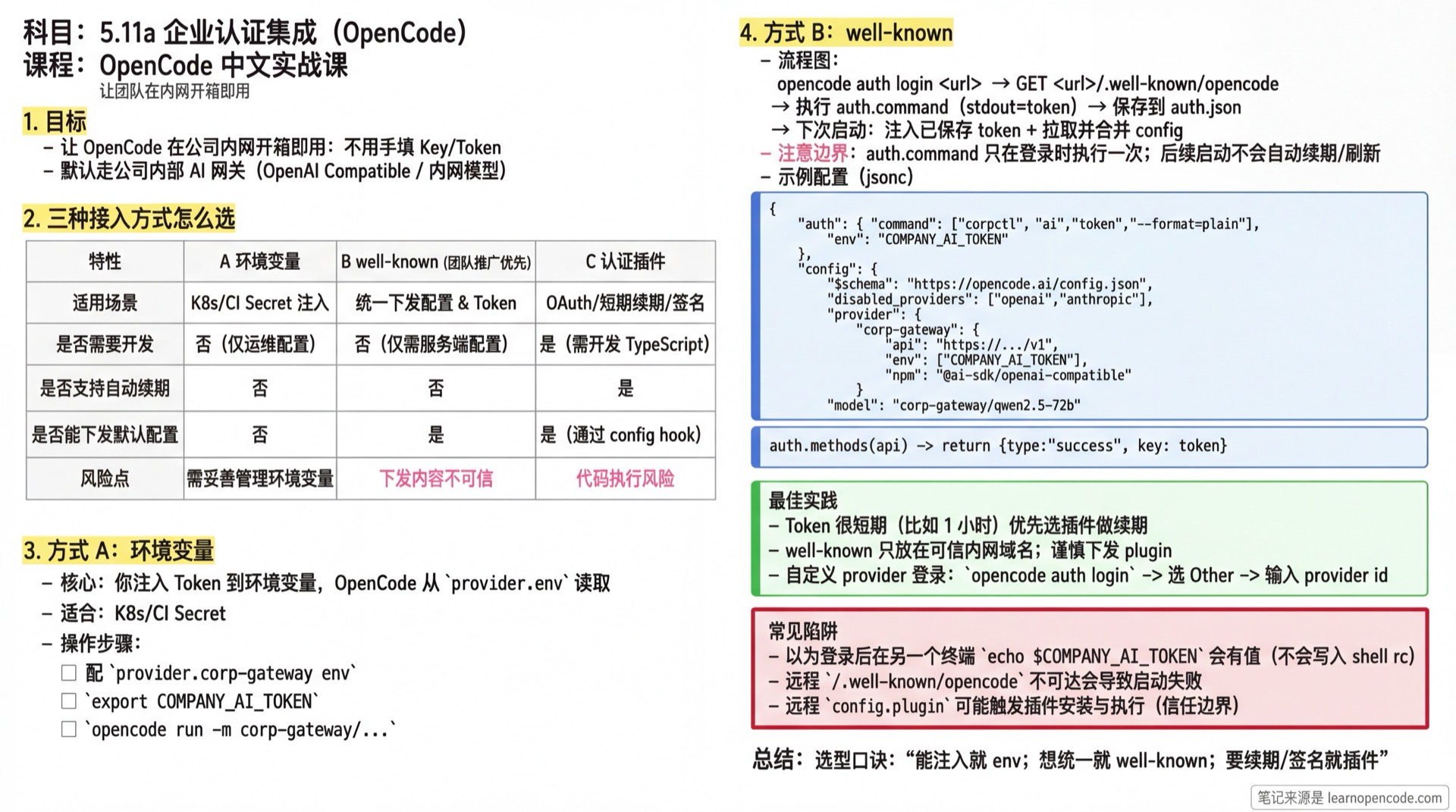
You can think of this lesson as one goal: Make OpenCode "work out of the box" on your company's internal network.
This lesson gives you 3 paths (from simplest to most flexible):
Environment Variables: You inject the Token yourselves, OpenCode just reads it
well-known: Run
auth.commandonce at login to save the token; subsequent startups inject the saved token and load either the embeddedconfigor the standalone JSON referenced byremote_config(no automatic renewal)Authentication Plugin: When you need OAuth/refresh/signing/modifying headers/params, implement via plugin
💡 How to Read This Lesson Quickly
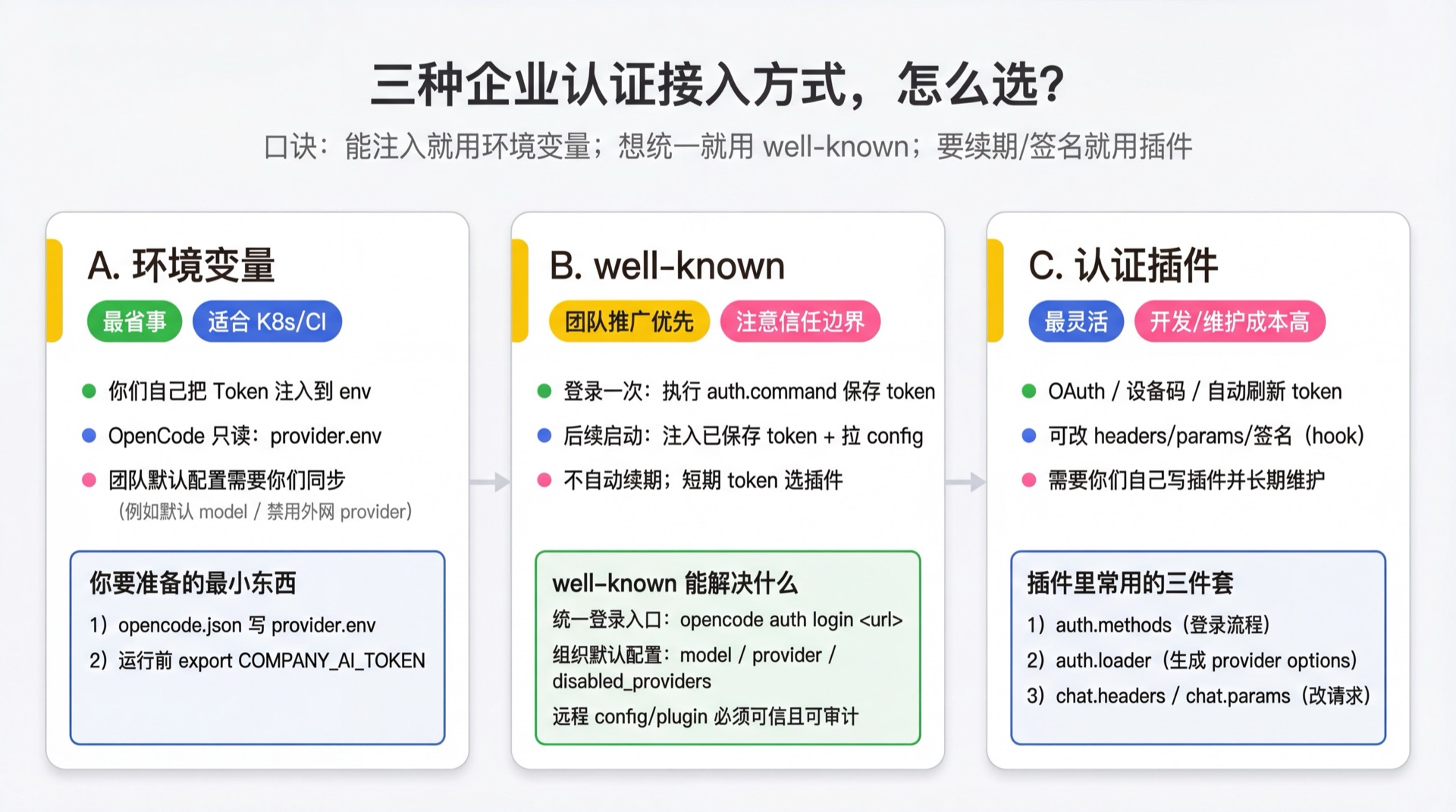
- First, look at the "3 Integration Methods Comparison" diagram, pick the path that best fits your team
- Then jump directly to the corresponding steps: Method A (Environment Variables) / Method B (well-known) / Method C (Plugin Authentication)
What You'll Be Able to Do
- Connect your company's unified authentication Token to OpenCode (no manual key entry per person)
- Use
/.well-known/opencodeto distribute default configurations to your team (e.g., force internal AI gateway) - Distinguish: when environment variables are enough, when to use well-known, and when you must write an authentication plugin
Your Current Challenge
- Your company has unified authentication (SSO/unified gateway), but OpenCode defaults to Provider Key configuration
- Having everyone copy-paste tokens: cumbersome, prone to expiration, and easy to leak
- You want: when team members run OpenCode, it automatically carries company credentials and only uses internal models by default
When to Use This Approach
- You can get a Token with a single command (e.g.,
corpctl token,sso login --print-token) - You have an internal domain that can serve
https://<host>/.well-known/opencode - You want to centrally manage "default model, default Provider, disable external Providers" configurations
🎒 Before You Start
- [ ] Read 5.1 Configuration Deep Dive
- [ ] Prepare an internal domain, e.g.,
https://ai.company.internal - [ ] Prepare a command to get a Token (recommended non-interactive: outputs token directly to stdout, doesn't depend on stdin interaction)
ℹ️ What Does "Token" Mean Here?
OpenCode's Provider typically needs a string: API Key, Bearer Token, or a temporary credential from a gateway.
The goal of this lesson is: automatically put this string into an environment variable so OpenCode's Provider can read it.
Core Concept
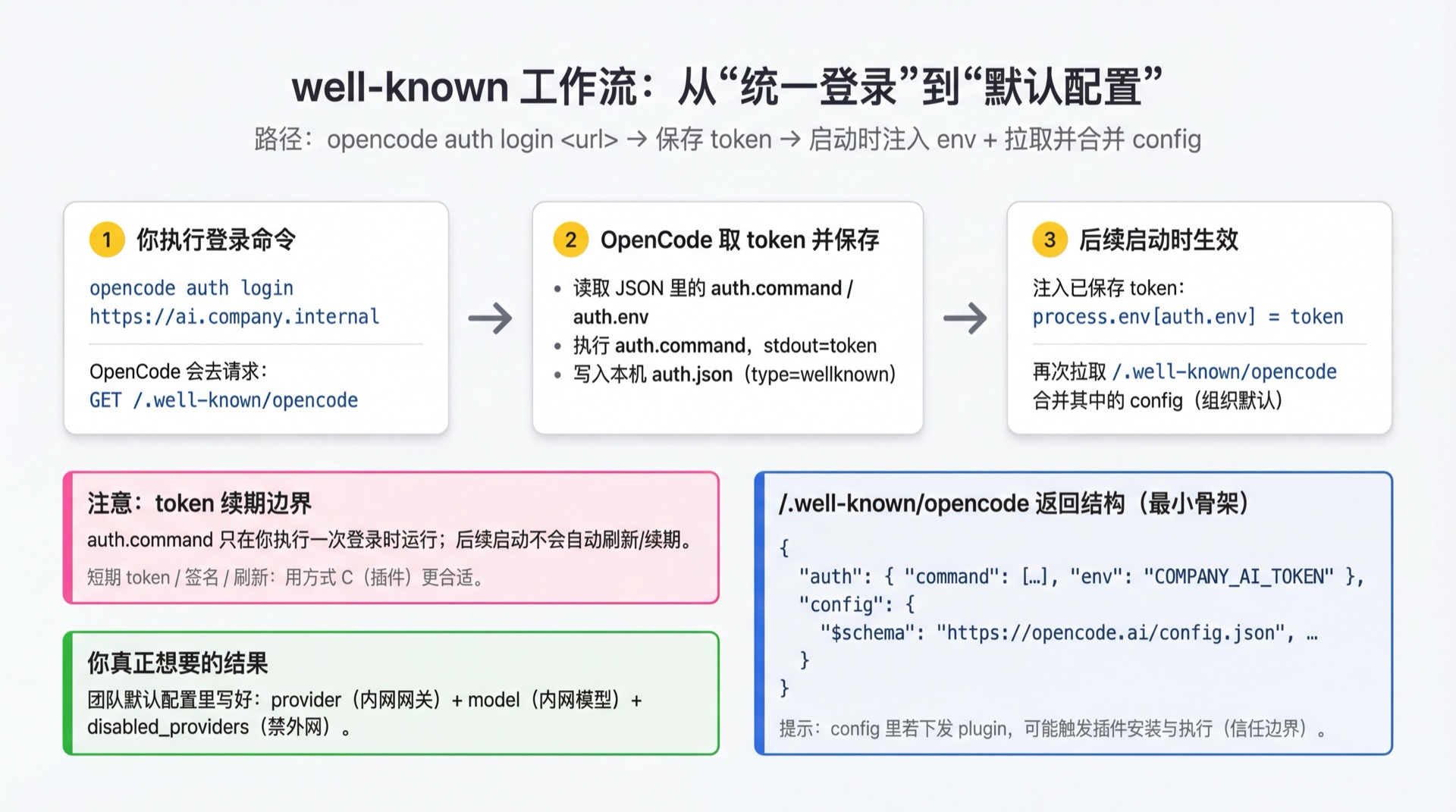
OpenCode has an entry point well-suited for enterprise intranets: opencode auth login <url>.
- It requests
<url>/.well-known/opencode, readsauth.commandandauth.env, then runsauth.commandlocally to retrieve and save the token (source:providers.ts:325-350). - When OpenCode loads its configuration, a saved
type: "wellknown"credential causes the token to be placed in an environment map used only for configuration-variable substitution, and theconfigfrom<url>/.well-known/opencodeis merged. If the response includesremote_config, OpenCode also fetches the standalone JSON at itsurl; fields in the remote JSON override the embeddedconfig(source:config.ts:356-393).
The 3 most common enterprise integration methods (from least to most code changes):
- Environment Variables: You inject Token into environment variables yourselves, OpenCode just reads it
- well-known: OpenCode handles "get Token + inject env + distribute default config"
- Authentication Plugin: When you need OAuth/refresh/signing/modify request headers, use a plugin to implement login flow and request rewriting
🤔 What is well-known?
/.well-known/ is a convention for a "fixed directory", commonly used for service discovery: clients just access a fixed path to get machine-readable configuration.
OpenCode defines an endpoint for enterprise scenarios: /.well-known/opencode.
It returns JSON that typically contains:
auth: Tells OpenCode what command to use to get the Token (auth.command), and which environment variable to inject the Token into (auth.env)config: Organization defaults embedded directly in the responseremote_config: Optional. Uses{ "url": "...", "headers": { ... } }to reference a standalone configuration JSON; the URL and header values support configuration-variable substitution
Note: OpenCode runs auth.command directly and fetches and merges config / remote_config at startup. Trust only enterprise domains you control.
If config contains plugin, OpenCode may automatically install the plugin package and import() it (source: packages/opencode/src/plugin/index.ts).
Simply put: treat /.well-known/opencode as "the configuration entry point distributed by the organization to development machines", and only deploy it on controllable, trusted internal domain names.
📦 well-known Distributes "Default Values", Not "Enforced Policies"
The OpenCode v1 loader merges configuration in this order (low → high):
Remote
/.well-known/opencode(organization defaults)Global configuration (legacy
config.json, thenopencode.json, thenopencode.jsonc; newly created global configuration defaults toopencode.jsonc)Custom config path (
OPENCODE_CONFIG)Project config (
opencode.json{,c}).opencode/directory config (including.opencode/opencode.json{,c}and.opencode/plugin/, etc.)
5.1) You can also use OPENCODE_CONFIG_DIR to specify an additional configuration directory, which is loaded as one of the directory sources
- Inline config (
OPENCODE_CONFIG_CONTENT)
(Enterprise Edition) The managed-configuration directory overrides every source above.
remote_config and the embedded wellknown.config are loaded before global, project, and .opencode/ configuration, so they provide organization defaults that later local sources can still override. See config.ts:356-429 for the implementation; the final managed-configuration merge is at config.ts:525-534.
So wellknown.config is better suited for "team default out-of-box experience".
But there's an exception: array fields like plugin/instructions are "merged and deduplicated" during merge, not simply overwritten (source: merge logic in packages/opencode/src/config/config.ts: uses Set to deduplicate by complete string value).
Among these, plugin does another "deduplicate by plugin name" pass, and higher priority sources override same-name plugins from lower priority sources (source: deduplicatePlugins() in packages/opencode/src/config/config.ts).
If you want to force everyone to only use the internal gateway, you typically need Enterprise Edition centralized management, or coordinate with IT/mirroring/permission policies to restrict local override entry points.
Follow Along
Step 1: Choose Your Integration Method
Why
Choosing the right method avoids wasted effort later.
| Your Situation | Choose |
|---|---|
| Already have a fixed Key (or can easily inject Token in K8s/CI) | Environment Variables |
| Can output Token with a command, and want to distribute default configs uniformly | well-known |
| Must use OAuth/device code/auto-refresh/signing/modify headers/params | Authentication Plugin |
Step 2 (Method A): Environment Variables Only (Simplest)
Why
If you can already put Token into environment variables (local / K8s / CI), OpenCode doesn't need any additional authentication mechanism.
- Configure an internal provider in
opencode.json, and specify which environment variable to read the key from:
// opencode.json
{
  "$schema": "https://opencode.ai/config.json",
  "provider": {
    "corp-gateway": {
      "name": "Company AI Gateway",
      "env": ["COMPANY_AI_TOKEN"],
      "api": "https://ai-gateway.company.internal/v1",
      "npm": "@ai-sdk/openai-compatible",
      "models": {
        "qwen2.5-72b": {
          "name": "Qwen 2.5 72B",
          "tool_call": true,
          "reasoning": true,
          "temperature": true,
          "limit": { "context": 128000, "output": 8192 }
        }
      }
    }
  },
  "model": "corp-gateway/qwen2.5-72b"
}- Inject environment variable before running and verify:
export COMPANY_AI_TOKEN="<your-token>"
opencode run -m corp-gateway/qwen2.5-72b "ping"$env:COMPANY_AI_TOKEN = "<your-token>"
opencode run -m corp-gateway/qwen2.5-72b "ping"You should see: opencode run returns model output.
💡 Great for K8s/CI
Just make COMPANY_AI_TOKEN a K8s Secret or CI Secret injection, no need for everyone to log in locally.
Step 3 (Method B): Use well-known for "Unified Login + Organization Config Distribution"
Why
well-known centralizes "get Token + default config" into one organization entry point: https://<host>/.well-known/opencode.
⚠️ Token Renewal Boundary
well-known's auth.command only runs once when you execute opencode auth login <url>, and saves the token locally.
On subsequent OpenCode startups, it only injects this "saved token", no auto-refresh/renewal.
If your tokens are very short-lived (e.g., 1 hour expiration), Method C is more suitable: use a plugin to implement refresh/signing flow.
If an SSO-protected well-known endpoint or remote_config returns an HTML login page instead of JSON, OpenCode recognizes it as missing or expired authentication and prompts you to run opencode auth login <url> again. The URL-based login path for that command does not first load the project instance that uses the old token, so reauthentication can proceed directly.
3.1 Prepare /.well-known/opencode Response
Whyopencode auth login <url> behavior is entirely driven by this JSON: it tells OpenCode what command to use to get the Token, which environment variable to put it in, and what organization default configs to distribute.
Here's a minimal working example (you need to return this at https://ai.company.internal/.well-known/opencode):
{
  "auth": {
    "command": ["corpctl", "ai", "token", "--format=plain"],
    "env": "COMPANY_AI_TOKEN"
  },

  // Optional: host organization configuration in a separate service.
  // The remote JSON overrides fields of the same name in config below.
  "remote_config": {
    "url": "https://config.company.internal/opencode.json",
    "headers": {
      "Authorization": "Bearer {env:COMPANY_AI_TOKEN}"
    }
  },

  "config": {
    "$schema": "https://opencode.ai/config.json",

    // Optional: Force disable external Providers (example)
    "disabled_providers": ["openai", "anthropic", "openrouter"],

    // Configure company internal AI Gateway (OpenAI Compatible)
    "provider": {
      "corp-gateway": {
        "name": "Company AI Gateway",
        "api": "https://ai-gateway.company.internal/v1",
        "npm": "@ai-sdk/openai-compatible",
        "options": {
          "apiKey": "{env:COMPANY_AI_TOKEN}"
        },
        "models": {
          "qwen2.5-72b": {
            "name": "Qwen 2.5 72B",
            "tool_call": true,
            "reasoning": true,
            "temperature": true,
            "limit": { "context": 128000, "output": 8192 }
          }
        }
      }
    },

    // Make team use internal model by default
    "model": "corp-gateway/qwen2.5-72b"
  }
}
You should see: Browser accessing https://ai.company.internal/.well-known/opencode returns the JSON above.
⚠️ Key Points
auth.commandmust be runnable on development machines/containers; its stdout will be treated as the Token.auth.envis the configuration-variable name. At startup, OpenCode places the saved token in a virtual environment map for the current configuration load so that{env:COMPANY_AI_TOKEN}can be substituted. It does not modifyprocess.envfor the current process or the system shell.
3.2 Use opencode auth login to Save Credentials Locally
Why
This step saves a type: "wellknown" credential to the local auth.json. On each subsequent startup, OpenCode makes the token available for configuration-variable substitution and fetches the remote config / remote_config.
opencode auth login https://ai.company.internalYou should see: Terminal output similar to:
Running \corpctl ai token --format=plain``Logged into https://ai.company.internal
3.3 Confirm Credentials Exist
Why
You need to confirm OpenCode actually saved the well-known credential to avoid "why isn't the config working" later.
opencode auth listYou should see: The list contains an entry like https://ai.company.internal wellknown (provider name may display as URL directly).
3.4 Verify Organization Default Config Works (Run run Once)
Why
The fastest verification: run opencode run once and see if it can complete tasks using your internal model.
opencode run -m corp-gateway/qwen2.5-72b "Explain the key points of this text in 3 sentences: ..."You should see: Normal model output returned; if failed, usually shows authentication/model not found/network error.
Step 4 (Method C): Write a Plugin for Unified Authentication (Most Flexible)
Why
When you're not just "running a command to output Token", but need OAuth, auto-refresh, request signing, dynamic header/param modification, plugins are the most reliable solution.
Boundary between v1 provider authentication and the v2 connector
The current compatibility interface still declares api or oauth methods through the plugin's auth.methods. oauth can use either an automatic callback or manual authorization-code entry, and loader then converts saved credentials into provider configuration. See the type definitions at packages/plugin/src/index.ts:88-180.
v1.18.22 also provides a v2 integration connector. An integration can register key, env, and oauth methods; the connection layer saves and resolves credentials and can invoke refresh when OAuth credentials are close to expiring. This is the v2 plugin interface—do not mix context.integration examples directly into the v1 Plugin skeleton below. See packages/plugin/src/v2/effect/integration.ts:15-62 for the interface and packages/core/src/integration.ts:380-457 for the connection and refresh flow.
4.1 Write an Authentication Plugin Skeleton
Place the file at .opencode/plugin/corp-auth.ts:
import type { Plugin } from "@opencode-ai/plugin"

const plugin: Plugin = async () => {
  return {
    auth: {
      // Must match your configured provider id
      provider: "corp-gateway",
      methods: [
        {
          type: "api",
          label: "Login with Company SSO",
          async authorize() {
            // Replace with your token retrieval logic: CLI/HTTP/local cache, etc.
            const token = "<replace-me>"
            return { type: "success", key: token }
          },
        },
      ],
      async loader(getAuth) {
        const auth = await getAuth()
        if (!auth || auth.type !== "api") return {}
        return {
          apiKey: auth.key,
          // headers: { "X-Tenant": "..." },
        }
      },
    },

    // To really modify headers/params/signing, these hooks are more direct
    // "chat.headers": async (_input, output) => { output.headers["X-Sign"] = "..." },
    // "chat.params": async (_input, output) => { output.options["seed"] = 1 },
  }
}

export default plugin
4.2 Let OpenCode Load Your Plugin
Recommended: After placing the plugin file in .opencode/plugin/ directory, OpenCode will automatically scan and load it (no need to write opencode.json).
📦 I Really Want to Put It in opencode.json
You can write a relative path, and OpenCode will resolve it to an importable file://... URL when loading config:
// opencode.json
{
  "plugin": ["./.opencode/plugin/corp-auth.ts"]
}
4.3 Use opencode auth login for Plugin Login
opencode auth loginYou should see:
- Providers in the selector come from models.dev list; your custom provider (e.g.,
corp-gateway) usually won't appear here - So the common approach is: select
Otherfirst, then enter provider id:corp-gateway, then proceed to the login flow defined in your pluginmethods
Checklist ✅
- [ ] Method A: After injecting environment variable,
opencode run -m corp-gateway/qwen2.5-72b ...works - [ ] Method B:
https://<host>/.well-known/opencodereturns JSON, andopencode auth login <url>succeeds - [ ] Method C: After enabling plugin,
opencode auth logincan go through plugin login and save credentials - [ ] Team default model points to internal Provider (
model: "corp-gateway/...")
Common Pitfalls
| Symptom | Cause | Solution |
|---|---|---|
After login, echo $COMPANY_AI_TOKEN shows no value in another terminal | The well-known token is placed only in the configuration-variable substitution map; it is not written to process.env or your .zshrc/.bashrc | Use options.apiKey: "{env:COMPANY_AI_TOKEN}" in the provider configuration and verify with opencode run -m corp-gateway/... |
opencode auth login directly returns 404/2000+ | /.well-known/opencode unreachable | First verify URL is accessible via browser/curl |
Shows Failed / No Logged into ... | auth.command exit code is not 0 | Ensure command runs on current machine, and stdout outputs Token |
| OpenCode reports that remote configuration returned a login page | The well-known endpoint or remote_config is behind SSO, and the saved token is missing or expired | Follow the error message and run opencode auth login <url> to authenticate again |
| OpenCode reports another remote-configuration error at startup | The well-known endpoint / remote_config is unreachable, returns non-JSON content, or contains invalid configuration | Check the remote endpoint and JSON; if necessary, use opencode auth logout to remove the URL credential before troubleshooting |
opencode auth login can't find your provider | Your provider is not in models.dev list | Select Other, manually enter provider id (e.g., corp-gateway) |
| Login succeeds but config doesn't take effect | Only Token saved, no config returned | Add config field to well-known JSON |
| Can login in container but not locally (or vice versa) | Command/certificate chain differences | Ensure both container and local machine have company root certificates installed, and auth.command works on both |
| Internal gateway returns 401 | Token not read by provider or expired | Check auth.env name matches; retest with Step 4 opencode run -m ...; if needed, re-run opencode auth login <url> |
Plugin placed in .opencode/plugin/ but doesn't work | Dependency preparation incomplete: OpenCode calls installDependencies(dir) on scanned directories. Only writes if directory lacks package.json/.gitignore; attempts bun add @opencode-ai/plugin@<version> --exact and bun install (both bun command failures are swallowed; file writes have no catch). Only waits for install when <dir>/node_modules doesn't exist; if exists, install triggers in background without waiting | Ensure npm/internal mirror accessible; manually run bun install in the directory if needed, or pre-bake dependencies into image/cache (source: installDependencies() in packages/opencode/src/config/config.ts) |
| Worried well-known is insecure | Remote JSON can distribute auth.command (runs locally), and config (fetched and merged on startup; plugin may trigger plugin installation and execution) | Treat /.well-known/opencode as "organization config distribution entry point": only deploy on trusted internal domains; restrict access; audit returned content; avoid distributing plugin in remote config unless necessary |
Lesson Summary
You learned:
- Environment Variables: Simplest, great for K8s/CI
- well-known: Best for team rollout, unified login and default config distribution
- Authentication Plugin: Most flexible, for OAuth/refresh/signing/modifying headers/params
Next Lesson Preview
The next lesson will make authentication and gateway capabilities more flexible: after learning the plugin system, you can write truly "enterprise-grade" custom login flows and request rewrites.
Next: 5.12a Plugin Basics.
Appendix: Source Code Reference
Click to expand source code locations
Baseline version: OpenCode
v1.18.22
| Feature | File Path | Lines |
|---|---|---|
config / remote_config schema for well-known | packages/core/src/v1/config/config.ts | 22-25 |
URL login: run auth.command and save the well-known credential | packages/opencode/src/cli/cmd/providers.ts | 325-350 |
Variable substitution in the remote_config URL and headers | packages/opencode/src/config/config.ts | 64-98 |
| Loading well-known remote configuration and merge order | packages/opencode/src/config/config.ts | 356-429 |
| Prompt to reauthenticate when remote configuration returns a login page | packages/opencode/src/cli/error.ts | 97-106 |
Legacy global-config compatibility and default opencode.jsonc | packages/opencode/src/config/config.ts | 139-147 |
Plugin authentication hook auth type definitions (methods / loader) | packages/plugin/src/index.ts | 88-180 |
| v2 integration connector methods and connection interface | packages/plugin/src/v2/effect/integration.ts | 15-62 |
Key Types:
Auth.WellKnown:{ type: "wellknown", key: string, token: string }AuthHook: Plugin auth interface, supportsapi/oauthmethods