

Plugins Advanced
💡 One-line summary: Learn the commonly used hook types and implement advanced plugin features.
📝 Course Notes
Key knowledge points from this lesson:
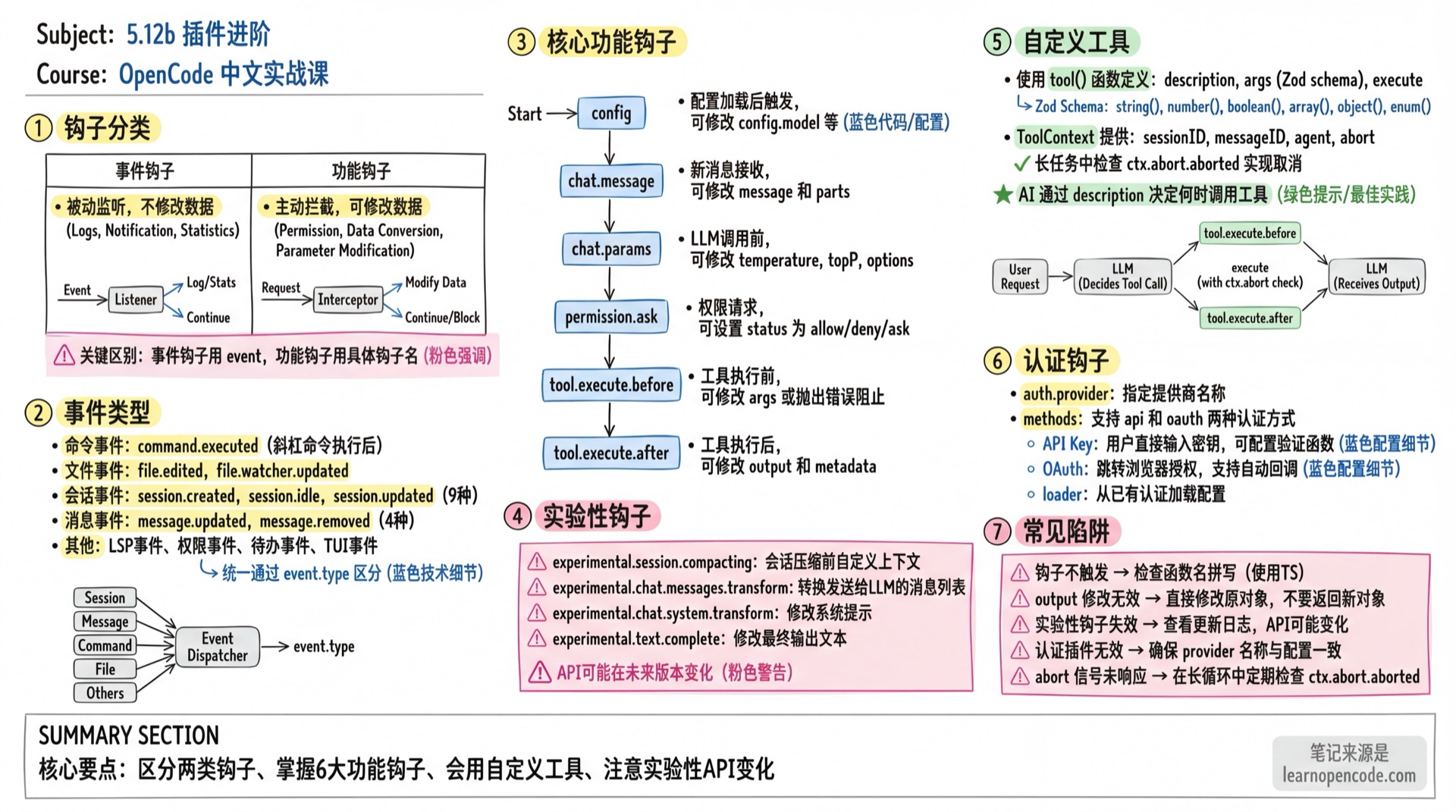
What You'll Be Able to Do
- Understand the difference between event hooks and functional hooks
- Use common hook types and consult the type definitions for the complete list
- Create custom tools
- Implement authentication plugins
Hook Categories
OpenCode plugins have two types of hooks:
| Type | Characteristics | Use Cases |
|---|---|---|
| Event Hooks | Passive listening, no data modification | Logging, notifications, statistics |
| Functional Hooks | Active interception, can modify data | Permission control, parameter modification, data transformation |
Event Hooks
Subscribe to all events using event:
export const MyPlugin: Plugin = async () => {
  return {
    event: async ({ event }) => {
      console.log(`Event: ${event.type}`, event.properties)
    },
  }
}
Functional Hooks
Intercept specific operations using concrete hook names:
export const MyPlugin: Plugin = async () => {
  return {
    "tool.execute.before": async (input, output) => {
      // Can modify output to affect subsequent execution
      console.log(`Tool: ${input.tool}`)
    },
  }
}
Event Types
Events are subscribed through the event hook and distinguished by event.type. The following are common events, not an exhaustive list. The target version also includes events for update availability, server disposal, VCS, and PTY; consult the SDK event union for the complete list.
Command Events
| Event | Trigger Timing |
|---|---|
command.executed | After slash command execution |
File Events
| Event | Trigger Timing |
|---|---|
file.edited | After file is edited |
file.watcher.updated | File watcher detects changes |
Installation Events
| Event | Trigger Timing |
|---|---|
installation.updated | After OpenCode installation/update |
LSP Events
| Event | Trigger Timing |
|---|---|
lsp.client.diagnostics | LSP diagnostics update |
lsp.updated | LSP service status change |
Message Events
| Event | Trigger Timing |
|---|---|
message.part.removed | Message part is deleted |
message.part.updated | Message part is updated |
message.removed | Message is deleted |
message.updated | Message is updated |
Permission Events
| Event | Trigger Timing |
|---|---|
permission.replied | User responds to permission request |
permission.updated | Permission status change |
Server Events
| Event | Trigger Timing |
|---|---|
server.connected | Server connection successful |
Session Events
| Event | Trigger Timing |
|---|---|
session.created | New session created |
session.compacted | Session compaction completed |
session.deleted | Session is deleted |
session.diff | Session diff generated |
session.error | Session error occurs |
session.idle | Session enters idle state (AI response complete) |
session.status | Session status change |
session.updated | Session info update |
Todo Events
| Event | Trigger Timing |
|---|---|
todo.updated | Todo list update |
TUI Events
| Event | Trigger Timing |
|---|---|
tui.prompt.append | Content appended to prompt |
tui.command.execute | TUI command execution |
tui.toast.show | Show toast notification |
Functional Hooks Details
config
Triggered after config is loaded, can modify configuration:
export const MyPlugin: Plugin = async () => {
  return {
    config: async (config) => {
      // config: Config object (see config.ts for full type definition)
      // Can directly modify properties, e.g.:
      config.model = "anthropic/claude-opus-4-5-thinking"
    },
  }
}
Parameter Type: config: Config (read/write)
chat.message
Triggered when new message is received, can modify message content:
export const MyPlugin: Plugin = async () => {
  return {
    "chat.message": async (input, output) => {
      // input: { sessionID, agent, model, messageID, variant }
      // output: { message, parts }
      console.log(`New message in session: ${input.sessionID}`)
    },
  }
}
input Type:
| Field | Type | Description |
|---|---|---|
sessionID | string | Session ID |
agent | string | Agent name |
model | { providerID, modelID } | Model info |
messageID | string | Message ID |
variant | string | Message variant |
output Type:
| Field | Type | Description |
|---|---|---|
message | Message | Message object (modifiable) |
parts | Part[] | Message content parts (modifiable) |
chat.params
Triggered before LLM call, can modify model parameters:
export const MyPlugin: Plugin = async () => {
  return {
    "chat.params": async (input, output) => {
      // input: { sessionID, agent, model, provider, message }
      // output: { temperature, topP, topK, options }

      // Force low temperature
      output.temperature = 0.3

      // Add a Provider option; this does not become an HTTP header
      output.options.seed = 1
    },
  }
}
input Type:
| Field | Type | Description |
|---|---|---|
sessionID | string | Session ID |
agent | string | Agent name |
model | { providerID, modelID } | Model info |
provider | Provider | Provider object |
message | Message | Current message |
output Type (modifiable):
| Field | Type | Description |
|---|---|---|
temperature | number? | Temperature parameter |
topP | number? | Top-P parameter |
topK | number? | Top-K parameter |
options | Record<string, unknown> | Custom Provider options; these are not HTTP headers |
Use the separate chat.headers hook to modify request headers:
export const TraceHeadersPlugin: Plugin = async () => ({
  "chat.headers": async (input, output) => {
    output.headers["X-Session-ID"] = input.sessionID
  },
})
permission.ask
Triggered on permission request, can modify permission decision:
export const MyPlugin: Plugin = async () => {
  return {
    "permission.ask": async (input, output) => {
      // input: Permission object
      // output: { status: "ask" | "deny" | "allow" }

      // Auto-allow a specific read pattern
      if (input.type === "read" && input.pattern?.startsWith("/safe/")) {
        output.status = "allow"
      }
    },
  }
}
tool.execute.before
Triggered before tool execution, can modify parameters or throw error to block execution:
export const MyPlugin: Plugin = async () => {
  return {
    "tool.execute.before": async (input, output) => {
      // input: { tool, sessionID, callID }
      // output: { args }

      if (input.tool === "bash" && output.args.command.includes("rm -rf")) {
        throw new Error("Dangerous command blocked!")
      }
    },
  }
}
input Type:
| Field | Type | Description |
|---|---|---|
tool | string | Tool name (e.g., read, bash, write) |
sessionID | string | Session ID |
callID | string | Tool call ID |
output Type (modifiable):
| Field | Type | Description |
|---|---|---|
args | Record<string, unknown> | Tool arguments (modifiable or interceptable) |
Throwing Error: Throwing Error will block tool execution, error message is returned to LLM.
tool.execute.after
Triggered after tool execution, can modify output:
export const MyPlugin: Plugin = async () => {
  return {
    "tool.execute.after": async (input, output) => {
      // input: { tool, sessionID, callID }
      // output: { title, output, metadata }

      // Add execution timestamp
      output.metadata.executedAt = new Date().toISOString()
    },
  }
}
input Type:
| Field | Type | Description |
|---|---|---|
tool | string | Tool name |
sessionID | string | Session ID |
callID | string | Tool call ID |
output Type (modifiable):
| Field | Type | Description |
|---|---|---|
title | string | Tool execution title (displayed in UI) |
output | string | Tool output content (returned to LLM) |
metadata | Record<string, unknown> | Metadata (freely addable) |
Experimental Hooks
⚠️ Warning: The following hooks are prefixed with
experimental.and API may change in future versions.
experimental.session.compacting
Triggered before session compaction, can customize compaction context:
export const CompactionPlugin: Plugin = async () => {
  return {
    "experimental.session.compacting": async (input, output) => {
      // input: { sessionID }
      // output: { context: string[], prompt?: string }

      // Method 1: Append extra context
      output.context.push(`
## Custom Context

Preserve the following state:
- Current task status
- Important decisions
- Files being processed
`)
    },
  }
}
Completely replace compaction prompt:
export const CustomCompactionPlugin: Plugin = async () => {
  return {
    "experimental.session.compacting": async (input, output) => {
      // Setting prompt completely replaces default compaction prompt
      // output.context array will be ignored
      output.prompt = `
You are generating a continuation prompt for a multi-agent session.

Please summarize:
1. Current task and its status
2. Files being modified and who is responsible
3. Dependencies between agents
4. Next steps to complete the work

Format as a structured prompt that a new agent can use to resume work.
`
    },
  }
}
experimental.chat.messages.transform
Triggered before messages are sent to LLM, can transform message list:
export const MyPlugin: Plugin = async () => {
  return {
    "experimental.chat.messages.transform": async (input, output) => {
      // output.messages: Array<{ info: Message, parts: Part[] }>

      // Filter certain messages
      output.messages = output.messages.filter(m =>
        !m.parts.some(p => p.type === "text" && p.text.includes("SECRET"))
      )
    },
  }
}
experimental.chat.system.transform
Triggered before system prompt is sent to LLM:
export const MyPlugin: Plugin = async () => {
  return {
    "experimental.chat.system.transform": async (input, output) => {
      // output.system: string[]

      // Append custom system instructions
      output.system.push("Always respond in formal English.")
    },
  }
}
experimental.text.complete
Triggered after text completion:
export const MyPlugin: Plugin = async () => {
  return {
    "experimental.text.complete": async (input, output) => {
      // input: { sessionID, messageID, partID }
      // output: { text }

      // Can modify the final output text
      output.text = output.text.replace(/\bAI\b/g, "Assistant")
    },
  }
}
Custom Tools
Plugins can add custom tools for AI to call:
import { type Plugin, tool } from "@opencode-ai/plugin"

export const CustomToolsPlugin: Plugin = async () => {
  return {
    tool: {
      mytool: tool({
        description: "This is a custom tool",
        args: {
          foo: tool.schema.string().describe("Input parameter"),
          count: tool.schema.number().optional().describe("Optional number parameter"),
        },
        async execute(args, ctx) {
          // args: { foo: string, count?: number }
          // ctx: ToolContext
          return `Hello ${args.foo}!`
        },
      }),
    },
  }
}
tool Function Parameters
| Parameter | Type | Description |
|---|---|---|
description | string | Tool description, AI decides when to use based on this |
args | Record<string, ZodType> | Define parameters using Zod schema |
execute | (args, ctx) => Promise<ToolResult> | Tool execution function; may return a string or a structured result |
ToolContext
The second parameter of execute function provides execution context:
| Property | Type | Description |
|---|---|---|
sessionID | string | Current session ID |
messageID | string | Current message ID |
agent | string | Agent name calling the tool |
abort | AbortSignal | Abort signal for canceling long operations |
directory | string | Current working directory |
worktree | string | Current worktree path |
metadata() | function | Update the tool call title and metadata |
ask() | function | Submit a permission request |
Using abort Signal
tool({
  description: "Long running task",
  args: {},
  async execute(args, ctx) {
    for (let i = 0; i < 100; i++) {
      if (ctx.abort.aborted) {
        return "Task cancelled"
      }
      await doWork(i)
    }
    return "Task completed"
  },
})
Zod Schema Quick Reference
tool.schema is Zod, common types:
tool.schema.string()           // String
tool.schema.number()           // Number
tool.schema.boolean()          // Boolean
tool.schema.array(...)         // Array
tool.schema.object({...})      // Object
tool.schema.enum(["a", "b"])   // Enum
tool.schema.optional()         // Optional (chained)
tool.schema.describe("...")    // Description (chained)
Authentication Hooks
v1 plugins can declare a set of authentication methods for a provider. The login UI reads methods and runs either an API-key or OAuth flow based on the user's choice; loader converts the saved credentials into provider configuration:
export const MyAuthPlugin: Plugin = async () => {
  return {
    auth: {
      provider: "my-provider",

      // Optional: Load config from existing auth
      loader: async (auth, provider) => {
        const token = await auth()
        if (token.type === "oauth") return { apiKey: token.access }
        return { apiKey: token.key }
      },

      methods: [
        {
          type: "api",
          label: "API Key",
          // OpenCode displays its built-in API-key password field and saves the credential
        },
        {
          type: "oauth",
          label: "OAuth Login",
          authorize: async () => {
            return {
              url: "https://example.com/oauth/authorize",
              instructions: "Complete login in browser",
              method: "auto",
              callback: async () => {
                // Wait for OAuth callback
                return {
                  type: "success",
                  access: "access_token",
                  refresh: "refresh_token",
                  expires: Date.now() + 3600000,
                }
              },
            }
          },
        },
      ],
    },
  }
}
Authentication Method Types
| Type | Description |
|---|---|
api | API Key method, user directly enters key |
oauth | OAuth method, redirects to browser for authorization |
OAuth's method is not an authentication type; it specifies the callback flow. auto means the plugin waits for the external browser callback itself, while code means the user pastes the authorization code back into OpenCode. The provider authentication service invokes authorize / callback by method index (source: provider/auth.ts:41-53, provider/auth.ts:163-180).
prompts Configuration
| Type | Description |
|---|---|
text | Text input field |
select | Dropdown select |
Each prompt can configure:
key: Key name for input valuemessage: Prompt messagevalidate: Validation functionwhen: Conditional rule that determines whether to show the prompt (the oldconditionfunction field is deprecated)
These prompts collect fields beyond the API key or additional OAuth parameters; they do not replace the built-in API-key password field provided by an api method. api.authorize is optional. If you do not need custom validation or credential exchange, omit it and let OpenCode save the key entered by the user directly.
Source: packages/plugin/src/index.ts:95-147.
v2 Integration Connector
v1.18.22 also provides a v2 connector interface for connecting integrations outside the provider system to credentials. It supports three method types:
| Method | Purpose |
|---|---|
key | Save an API key entered by the user |
env | Resolve credentials from a specified environment variable |
oauth | External-browser OAuth with automatic callbacks or authorization codes, plus an optional refresh function |
A v2 plugin uses context.integration.transform to register or modify an integration and its methods, and context.integration.connection.active/resolve to obtain the current connection. See the Effect interface at packages/plugin/src/v2/effect/integration.ts:15-62 and the Promise interface at packages/plugin/src/v2/promise/integration.ts:1-14.
Do not mix the two generations of interfaces
The auth: { provider, methods, loader } example above belongs to the v1 Plugin interface. The v2 connector uses context.integration, and its integration connection layer saves, resolves, and refreshes credentials. Do not combine fields from both generations in the same object.
Complete Example: Time Tracking Plugin
import type { Plugin } from "@opencode-ai/plugin"

export const TimeTrackingPlugin: Plugin = async ({ client }) => {
  const sessionTimes = new Map<string, number>()

  return {
    event: async ({ event }) => {
      if (event.type === "session.created") {
        const sessionID = event.properties.info.id
        sessionTimes.set(sessionID, Date.now())
        await client.app.log({
          body: {
            service: "time-tracking",
            level: "info",
            message: `Session started: ${sessionID}`,
          },
        })
      }

      if (event.type === "session.idle") {
        const startTime = sessionTimes.get(event.properties.sessionID)
        if (startTime) {
          const duration = Date.now() - startTime
          await client.app.log({
            body: {
              service: "time-tracking",
              level: "info",
              message: `Session duration: ${Math.round(duration / 1000)}s`,
              extra: { sessionID: event.properties.sessionID, duration },
            },
          })
        }
      }
    },

    "chat.headers": async (input, output) => {
      // Add tracking headers to all requests
      output.headers["X-Session-ID"] = input.sessionID
    },
  }
}
Common Pitfalls
| Symptom | Cause | Solution |
|---|---|---|
| Hook doesn't trigger | Function name typo | Use TypeScript for type checking |
output modification ineffective | Returned new object instead of modifying original | Directly modify output.xxx = ... |
| Experimental hook fails | API changed after version update | Check changelog, adjust code |
| Auth plugin ineffective | provider name mismatch | Ensure it matches provider ID in config |
| abort signal not responding | Not checking ctx.abort.aborted | Periodically check in long loops |
Lesson Summary
You learned:
- The difference between event hooks and functional hooks
- Common hook types and their uses, plus how to consult the complete type definitions
- Creating custom tools (with abort signal handling)
- Implementing authentication plugins
Related Resources
- 5.12a Plugins Basics - Plugin installation and basic usage
- 5.10 SDK Development - Using SDK client
- 5.13 Custom Tools - More tool development examples
- Ecosystem - Community plugin examples