

插件进阶
💡 一句话总结:学会常用钩子类型,实现高级插件功能。
📝 课程笔记
本课核心知识点整理:
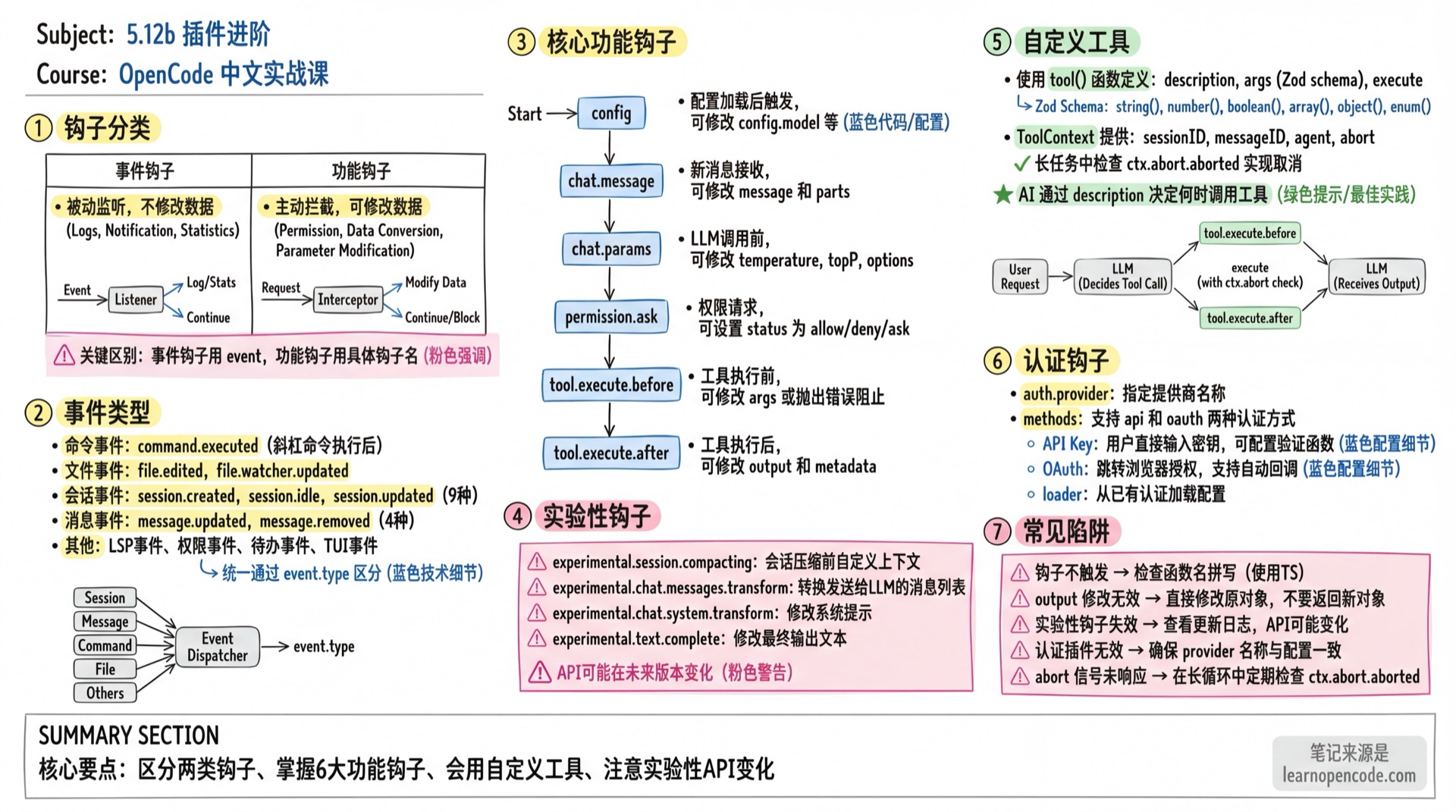
学完你能做什么
- 理解事件钩子与功能钩子的区别
- 使用常用钩子类型,并通过类型定义查找完整列表
- 创建自定义工具
- 实现认证插件
钩子分类
OpenCode 插件有两类钩子:
| 类型 | 特点 | 用途 |
|---|---|---|
| 事件钩子 | 被动监听,不修改数据 | 日志、通知、统计 |
| 功能钩子 | 主动拦截,可修改数据 | 权限控制、参数修改、数据转换 |
事件钩子
使用 event 统一订阅插件可以收到的事件:
export const MyPlugin: Plugin = async () => {
  return {
    event: async ({ event }) => {
      console.log(`Event: ${event.type}`, event.properties)
    },
  }
}
功能钩子
使用具体钩子名拦截特定操作:
export const MyPlugin: Plugin = async () => {
  return {
    "tool.execute.before": async (input, output) => {
      // 可以修改 output 影响后续执行
      console.log(`Tool: ${input.tool}`)
    },
  }
}
事件类型
事件通过 event 钩子订阅,按 event.type 区分。下面列的是常用事件,不是完整清单;目标版本还包含更新可用、服务器释放、VCS 和 PTY 等事件,请以 SDK 的事件联合类型为准。
命令事件
| 事件 | 触发时机 |
|---|---|
command.executed | 斜杠命令执行后 |
文件事件
| 事件 | 触发时机 |
|---|---|
file.edited | 文件被编辑后 |
file.watcher.updated | 文件监视器检测到变化 |
安装事件
| 事件 | 触发时机 |
|---|---|
installation.updated | OpenCode 安装/更新后 |
LSP 事件
| 事件 | 触发时机 |
|---|---|
lsp.client.diagnostics | LSP 诊断信息更新 |
lsp.updated | LSP 服务状态变化 |
消息事件
| 事件 | 触发时机 |
|---|---|
message.part.removed | 消息片段被删除 |
message.part.updated | 消息片段被更新 |
message.removed | 消息被删除 |
message.updated | 消息被更新 |
权限事件
| 事件 | 触发时机 |
|---|---|
permission.replied | 用户响应权限请求 |
permission.updated | 权限状态变化 |
服务器事件
| 事件 | 触发时机 |
|---|---|
server.connected | 服务器连接成功 |
会话事件
| 事件 | 触发时机 |
|---|---|
session.created | 新会话创建 |
session.compacted | 会话压缩完成 |
session.deleted | 会话被删除 |
session.diff | 会话差异生成 |
session.error | 会话发生错误 |
session.idle | 会话进入空闲状态(AI 响应完成) |
session.status | 会话状态变化 |
session.updated | 会话信息更新 |
待办事件
| 事件 | 触发时机 |
|---|---|
todo.updated | 待办列表更新 |
TUI 事件
| 事件 | 触发时机 |
|---|---|
tui.prompt.append | 提示框追加内容 |
tui.command.execute | TUI 命令执行 |
tui.toast.show | 显示提示通知 |
功能钩子详解
config
配置加载后触发,可修改配置:
export const MyPlugin: Plugin = async () => {
  return {
    config: async (config) => {
      // config: Config 对象(完整类型定义见 config.ts)
      // 可直接修改属性,如:
      config.model = "anthropic/claude-opus-4-5-thinking"
    },
  }
}参数类型:config: Config(可读写)
chat.message
新消息接收时触发,可修改消息内容:
export const MyPlugin: Plugin = async () => {
  return {
    "chat.message": async (input, output) => {
      // input: { sessionID, agent, model, messageID, variant }
      // output: { message, parts }
      console.log(`New message in session: ${input.sessionID}`)
    },
  }
}
input 类型:
| 字段 | 类型 | 说明 |
|---|---|---|
sessionID | string | 会话 ID |
agent | string | Agent 名称 |
model | { providerID, modelID } | 模型信息 |
messageID | string | 消息 ID |
variant | string | 消息变体 |
output 类型:
| 字段 | 类型 | 说明 |
|---|---|---|
message | Message | 消息对象(可修改) |
parts | Part[] | 消息内容部分(可修改) |
chat.params
LLM 调用前触发,可修改模型参数:
export const MyPlugin: Plugin = async () => {
  return {
    "chat.params": async (input, output) => {
      // input: { sessionID, agent, model, provider, message }
      // output: { temperature, topP, topK, options }

      // 强制使用低温度
      output.temperature = 0.3

      // 添加 Provider 参数,不会自动变成 HTTP Header
      output.options.seed = 1
    },
  }
}
input 类型:
| 字段 | 类型 | 说明 |
|---|---|---|
sessionID | string | 会话 ID |
agent | string | Agent 名称 |
model | { providerID, modelID } | 模型信息 |
provider | Provider | 提供商对象 |
message | Message | 当前消息 |
output 类型(可修改):
| 字段 | 类型 | 说明 |
|---|---|---|
temperature | number? | 温度参数 |
topP | number? | Top-P 参数 |
topK | number? | Top-K 参数 |
options | Record<string, unknown> | 传给 Provider 的自定义参数,不等同于 HTTP Header |
需要修改请求头时使用独立的 chat.headers 钩子:
export const TraceHeadersPlugin: Plugin = async () => ({
  "chat.headers": async (input, output) => {
    output.headers["X-Session-ID"] = input.sessionID
  },
})
permission.ask
权限请求时触发,可修改权限决策:
export const MyPlugin: Plugin = async () => {
  return {
    "permission.ask": async (input, output) => {
      // input: Permission 对象
      // output: { status: "ask" | "deny" | "allow" }

      // 自动允许特定读取模式
      if (input.type === "read" && input.pattern?.startsWith("/safe/")) {
        output.status = "allow"
      }
    },
  }
}
tool.execute.before
工具执行前触发,可修改参数或抛出错误阻止执行:
export const MyPlugin: Plugin = async () => {
  return {
    "tool.execute.before": async (input, output) => {
      // input: { tool, sessionID, callID }
      // output: { args }

      if (input.tool === "bash" && output.args.command.includes("rm -rf")) {
        throw new Error("Dangerous command blocked!")
      }
    },
  }
}
input 类型:
| 字段 | 类型 | 说明 |
|---|---|---|
tool | string | 工具名称(如 read、bash、write) |
sessionID | string | 会话 ID |
callID | string | 工具调用 ID |
output 类型(可修改):
| 字段 | 类型 | 说明 |
|---|---|---|
args | Record<string, unknown> | 工具参数(可修改或拦截) |
抛出错误:抛出 Error 会阻止工具执行,错误信息返回给 LLM。
tool.execute.after
工具执行后触发,可修改输出:
export const MyPlugin: Plugin = async () => {
  return {
    "tool.execute.after": async (input, output) => {
      // input: { tool, sessionID, callID }
      // output: { title, output, metadata }

      // 添加执行时间戳
      output.metadata.executedAt = new Date().toISOString()
    },
  }
}
input 类型:
| 字段 | 类型 | 说明 |
|---|---|---|
tool | string | 工具名称 |
sessionID | string | 会话 ID |
callID | string | 工具调用 ID |
output 类型(可修改):
| 字段 | 类型 | 说明 |
|---|---|---|
title | string | 工具执行标题(显示在 UI 中) |
output | string | 工具输出内容(返回给 LLM) |
metadata | Record<string, unknown> | 元数据(可自由添加) |
实验性钩子
⚠️ 警告:以下钩子以
experimental.开头,API 可能在未来版本变化。
experimental.session.compacting
会话压缩前触发,可自定义压缩上下文:
export const CompactionPlugin: Plugin = async () => {
  return {
    "experimental.session.compacting": async (input, output) => {
      // input: { sessionID }
      // output: { context: string[], prompt?: string }

      // 方式1:追加额外上下文
      output.context.push(`
## 自定义上下文

保留以下状态:
- 当前任务状态
- 重要决策
- 正在处理的文件
`)
    },
  }
}
完全替换压缩提示:
export const CustomCompactionPlugin: Plugin = async () => {
  return {
    "experimental.session.compacting": async (input, output) => {
      // 设置 prompt 会完全替换默认压缩提示
      // 此时 output.context 数组将被忽略
      output.prompt = `
你正在为多代理会话生成续写提示。

请总结:
1. 当前任务及其状态
2. 正在修改的文件及负责人
3. 代理之间的依赖关系
4. 完成工作的下一步

格式化为新代理可以用来恢复工作的结构化提示。
`
    },
  }
}
experimental.chat.messages.transform
消息发送给 LLM 前触发,可转换消息列表:
export const MyPlugin: Plugin = async () => {
  return {
    "experimental.chat.messages.transform": async (input, output) => {
      // output.messages: Array<{ info: Message, parts: Part[] }>

      // 过滤某些消息
      output.messages = output.messages.filter(m =>
        !m.parts.some(p => p.type === "text" && p.text.includes("SECRET"))
      )
    },
  }
}
experimental.chat.system.transform
系统提示发送给 LLM 前触发:
export const MyPlugin: Plugin = async () => {
  return {
    "experimental.chat.system.transform": async (input, output) => {
      // output.system: string[]

      // 追加自定义系统指令
      output.system.push("Always respond in formal English.")
    },
  }
}
experimental.text.complete
文本补全后触发:
export const MyPlugin: Plugin = async () => {
  return {
    "experimental.text.complete": async (input, output) => {
      // input: { sessionID, messageID, partID }
      // output: { text }

      // 可以修改最终输出的文本
      output.text = output.text.replace(/\bAI\b/g, "Assistant")
    },
  }
}
自定义工具
插件可以添加自定义工具供 AI 调用:
import { type Plugin, tool } from "@opencode-ai/plugin"

export const CustomToolsPlugin: Plugin = async () => {
  return {
    tool: {
      mytool: tool({
        description: "这是一个自定义工具",
        args: {
          foo: tool.schema.string().describe("输入参数"),
          count: tool.schema.number().optional().describe("可选的数字参数"),
        },
        async execute(args, ctx) {
          // args: { foo: string, count?: number }
          // ctx: ToolContext
          return `Hello ${args.foo}!`
        },
      }),
    },
  }
}
tool 函数参数
| 参数 | 类型 | 说明 |
|---|---|---|
description | string | 工具功能描述,AI 根据此决定何时使用 |
args | Record<string, ZodType> | 使用 Zod schema 定义参数 |
execute | (args, ctx) => Promise<ToolResult> | 工具执行函数;可返回字符串或结构化结果 |
ToolContext
execute 函数的第二个参数提供执行上下文:
| 属性 | 类型 | 说明 |
|---|---|---|
sessionID | string | 当前会话 ID |
messageID | string | 当前消息 ID |
agent | string | 调用工具的 Agent 名称 |
abort | AbortSignal | 中止信号,用于取消长时间操作 |
directory | string | 当前工作目录 |
worktree | string | 当前 worktree 路径 |
metadata() | function | 更新工具调用的标题和元数据 |
ask() | function | 发起权限请求 |
使用 abort 信号
tool({
  description: "长时间运行的任务",
  args: {},
  async execute(args, ctx) {
    for (let i = 0; i < 100; i++) {
      if (ctx.abort.aborted) {
        return "任务被取消"
      }
      await doWork(i)
    }
    return "任务完成"
  },
})
Zod Schema 速查
tool.schema 就是 Zod,常用类型:
tool.schema.string()           // 字符串
tool.schema.number()           // 数字
tool.schema.boolean()          // 布尔
tool.schema.array(...)         // 数组
tool.schema.object({...})      // 对象
tool.schema.enum(["a", "b"])   // 枚举
tool.schema.optional()         // 可选(链式调用)
tool.schema.describe("...")    // 描述(链式调用)
认证钩子
v1 插件可以为 Provider 声明一组认证方法。登录界面读取 methods,根据用户选择执行 API Key 或 OAuth 流程;loader 把已保存凭据转换为 Provider 配置:
export const MyAuthPlugin: Plugin = async () => {
  return {
    auth: {
      provider: "my-provider",

      // 可选:从已有认证加载配置
      loader: async (auth, provider) => {
        const token = await auth()
        if (token.type === "oauth") return { apiKey: token.access }
        return { apiKey: token.key }
      },

      methods: [
        {
          type: "api",
          label: "API Key",
          // OpenCode 会显示内置的 API Key 密码输入框并保存凭据
        },
        {
          type: "oauth",
          label: "OAuth Login",
          authorize: async () => {
            return {
              url: "https://example.com/oauth/authorize",
              instructions: "Complete login in browser",
              method: "auto",
              callback: async () => {
                // 等待 OAuth 回调
                return {
                  type: "success",
                  access: "access_token",
                  refresh: "refresh_token",
                  expires: Date.now() + 3600000,
                }
              },
            }
          },
        },
      ],
    },
  }
}
认证方法类型
| 类型 | 说明 |
|---|---|
api | API Key 方式,用户直接输入密钥 |
oauth | OAuth 方式,跳转浏览器授权 |
OAuth 的 method 不是认证类型,而是回调方式:auto 表示插件自行等待外部浏览器回调,code 表示用户把授权码粘贴回来。Provider 认证服务按方法索引调用 authorize / callback(源码:provider/auth.ts:41-53、provider/auth.ts:163-180)。
prompts 配置
| 类型 | 说明 |
|---|---|
text | 文本输入框 |
select | 下拉选择框 |
每个 prompt 可以配置:
key:输入值的键名message:提示信息validate:验证函数when:条件规则,决定是否显示此 prompt(旧condition函数字段已弃用)
这些 prompts 用于收集 API Key 之外的附加字段或 OAuth 参数,不替代 api 方法自带的 API Key 密码输入框。api.authorize 是可选的;不需要自定义验证或换取凭据时应省略,让 OpenCode 直接保存用户输入的 Key。
源码:packages/plugin/src/index.ts:95-147。
v2 integration connector
v1.18.22 还提供 v2 connector 接口,用于把 Provider 之外的 integration 与凭据连接起来。它支持三类方法:
| 方法 | 用途 |
|---|---|
key | 保存用户输入的 API Key |
env | 从指定环境变量解析凭据 |
oauth | 外部浏览器 OAuth,支持自动回调或授权码,并可注册刷新函数 |
v2 插件通过 context.integration.transform 注册或修改 integration 及其方法,通过 context.integration.connection.active/resolve 取得当前连接。Effect 接口见 packages/plugin/src/v2/effect/integration.ts:15-62,Promise 接口见 packages/plugin/src/v2/promise/integration.ts:1-14。
不要混用两代接口
上面的 auth: { provider, methods, loader } 示例属于 v1 Plugin。v2 connector 使用 context.integration,凭据由 integration connection 层保存、解析和刷新;不要把两者的字段拼在同一个对象里。
完整示例:时间追踪插件
import type { Plugin } from "@opencode-ai/plugin"

export const TimeTrackingPlugin: Plugin = async ({ client }) => {
  const sessionTimes = new Map<string, number>()

  return {
    event: async ({ event }) => {
      if (event.type === "session.created") {
        const sessionID = event.properties.info.id
        sessionTimes.set(sessionID, Date.now())
        await client.app.log({
          body: {
            service: "time-tracking",
            level: "info",
            message: `Session started: ${sessionID}`,
          },
        })
      }

      if (event.type === "session.idle") {
        const startTime = sessionTimes.get(event.properties.sessionID)
        if (startTime) {
          const duration = Date.now() - startTime
          await client.app.log({
            body: {
              service: "time-tracking",
              level: "info",
              message: `Session duration: ${Math.round(duration / 1000)}s`,
              extra: { sessionID: event.properties.sessionID, duration },
            },
          })
        }
      }
    },

    "chat.headers": async (input, output) => {
      // 为所有请求添加追踪头
      output.headers["X-Session-ID"] = input.sessionID
    },
  }
}
踩坑提醒
| 现象 | 原因 | 解决 |
|---|---|---|
| 钩子不触发 | 函数名拼写错误 | 使用 TypeScript 获得类型检查 |
output 修改无效 | 返回了新对象而非修改原对象 | 直接修改 output.xxx = ... |
| 实验性钩子失效 | 版本更新后 API 变化 | 查看更新日志,调整代码 |
| 认证插件无效 | provider 名称不匹配 | 确保与配置中的提供商 ID 一致 |
| abort 信号未响应 | 未检查 ctx.abort.aborted | 在长循环中定期检查 |
本课小结
你学会了:
- 事件钩子与功能钩子的区别
- 常用钩子类型及其用途,以及查阅完整类型定义的方法
- 创建自定义工具(含 abort 信号处理)
- 实现认证插件
相关资源
- 5.12a 插件基础 - 插件安装和基本用法
- 5.10 SDK 开发 - 使用 SDK 客户端
- 5.13 自定义工具 - 更多工具开发示例
- 生态系统 - 社区插件示例