

5.10a SDK 基础
一句话总结:使用 JavaScript/TypeScript SDK 以编程方式控制 OpenCode,实现自动化工作流和自定义集成。
📝 课程笔记
本课核心知识点整理:
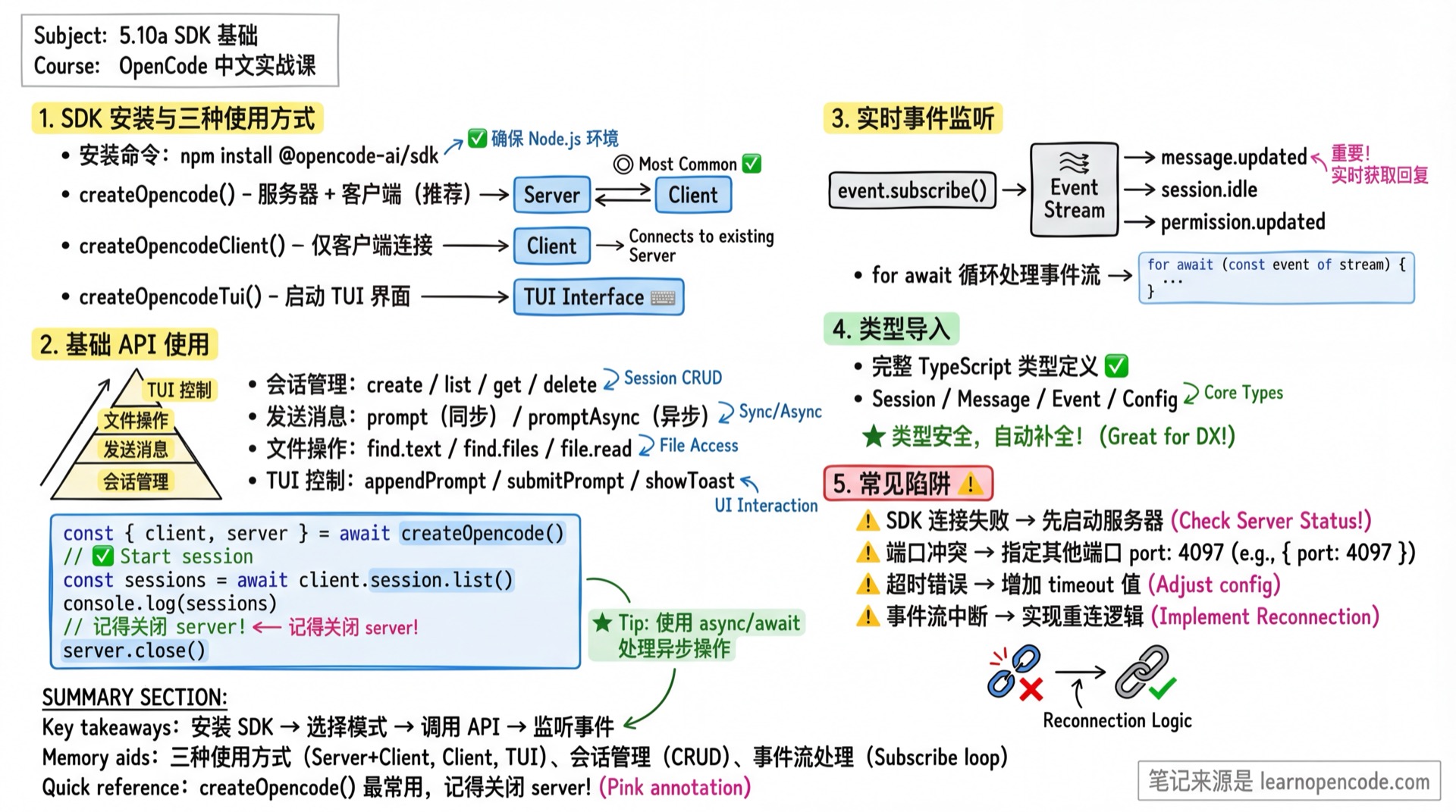
学完你能做什么
- 安装和配置 OpenCode SDK
- 创建服务器和客户端实例
- 启动 TUI 界面
- 管理会话和发送消息
- 监听实时事件
你现在的困境
- 想在自己的应用里调用 OpenCode
- 想以编程方式批量处理任务
- 想构建自定义集成(IDE 插件、CI/CD 工具等)
- 想在脚本中自动化 OpenCode 操作
SDK 架构概览
┌─────────────────────────────────────────────────────────┐
│                    你的应用程序                           │
├─────────────────────────────────────────────────────────┤
│                   @opencode-ai/sdk                       │
│  ┌─────────────┐  ┌─────────────┐  ┌─────────────┐      │
│  │createOpencode│  │createOpencode│  │createOpencode│    │
│  │             │  │   Client    │  │    Tui      │      │
│  └──────┬──────┘  └──────┬──────┘  └──────┬──────┘      │
│         │                │                │              │
│  服务器+客户端      仅客户端连接      启动 TUI 界面       │
└─────────┼────────────────┼────────────────┼─────────────┘
          │                │                │
          ▼                ▼                ▼
┌─────────────────────────────────────────────────────────┐
│                  OpenCode Server                         │
│            HTTP API (默认端口 4096)                       │
└─────────────────────────────────────────────────────────┘
安装 SDK
npm install @opencode-ai/sdkV1 与 V2 入口
本课现有示例使用 V1 入口 @opencode-ai/sdk。到 v1.18.22,V1 没有移除;同一个包另外导出 @opencode-ai/sdk/v2,用于会话、问题、当前位置、事件流、历史分页、运行时操作和权限请求等 V2 扩展。两套入口参数结构不同,不要只改 import 后继续照搬 V1 的 { path, body } 调用。
// V1:本课后续示例使用这个入口
import { createOpencodeClient } from "@opencode-ai/sdk"

// V2:平铺参数,详见 5.10c
import { createOpencodeClient as createV2Client } from "@opencode-ai/sdk/v2"
来源:
packages/sdk/js/package.json:12-20、V1 sdk.gen.ts:431-700、V2 location:5038-5058、V2 session:5171-5793
三种使用方式
1. 创建服务器 + 客户端(推荐)
同时启动服务器和客户端,适合独立脚本和自动化场景:
import { createOpencode } from "@opencode-ai/sdk"

const { client, server } = await createOpencode()

// 使用 client 调用 API
const sessions = await client.session.list()
console.log(`当前有 ${sessions.data?.length} 个会话`)

// 完成后关闭服务器
server.close()
ServerOptions 参数
| 参数 | 类型 | 描述 | 默认值 |
|---|---|---|---|
hostname | string | 服务器主机名 | 127.0.0.1 |
port | number | 服务器端口 | 4096 |
signal | AbortSignal | 用于取消的中止信号 | undefined |
timeout | number | 服务器启动超时(毫秒) | 5000 |
config | Config | 配置对象,覆盖 opencode.json | {} |
来源:
packages/sdk/js/src/server.ts:5-11
配置覆盖示例
import { createOpencode } from "@opencode-ai/sdk"

const opencode = await createOpencode({
  hostname: "127.0.0.1",
  port: 4097,  // 使用不同端口避免冲突
  timeout: 10000,
  config: {
    model: "anthropic/claude-opus-4-5-thinking",
    logLevel: "DEBUG",
  },
})

console.log(`服务器运行在 ${opencode.server.url}`)

// 使用完毕后关闭
opencode.server.close()
2. 仅客户端模式
连接到已运行的 OpenCode 实例,适合插件开发:
import { createOpencodeClient } from "@opencode-ai/sdk"

const client = createOpencodeClient({
  baseUrl: "http://localhost:4096",
})

// 直接使用 client
const sessions = await client.session.list()
ClientOptions 参数
| 参数 | 类型 | 描述 | 默认值 |
|---|---|---|---|
baseUrl | string | 服务器 URL | http://localhost:4096 |
fetch | function | 自定义 fetch 实现 | globalThis.fetch |
parseAs | string | 响应解析方式:auto, json, text, blob, arrayBuffer, stream, formData | auto |
responseStyle | "data" | "fields" | 返回风格:data 仅返回数据,fields 返回完整响应 | fields |
throwOnError | boolean | 出错时抛出异常而非返回 | false |
directory | string | 指定项目目录(通过 X-Opencode-Directory header 传递) | undefined |
来源:
packages/sdk/js/src/gen/client/types.gen.ts:10-52、packages/sdk/js/src/client.ts:33
多项目目录切换
// 连接到不同项目
const client = createOpencodeClient({
  baseUrl: "http://localhost:4096",
  directory: "/path/to/my-project",
})
远程连接(带认证)
当连接远程 OpenCode 服务器时,如果服务器设置了 OPENCODE_SERVER_PASSWORD,需要通过 headers 传递 Basic Auth 认证:
import { createOpencodeClient } from "@opencode-ai/sdk"

// 远程连接(带认证)
const client = createOpencodeClient({
  baseUrl: "http://192.168.1.100:4096",
  headers: {
    // Basic Auth 格式:Base64(username:password)
    // 浏览器/Edge Runtime 用 btoa()
    Authorization: `Basic ${btoa("opencode:your-password")}`
  },
  directory: "/projects/my-app"  // 指定远程项目目录
})
Node.js 环境用 Buffer
// Node.js 没有 btoa,用 Buffer 代替
Authorization: `Basic ${Buffer.from("opencode:password").toString("base64")}`| 场景 | 用户名 | 说明 |
|---|---|---|
| 默认 | opencode | 服务器默认用户名 |
| 自定义 | 环境变量 OPENCODE_SERVER_USERNAME 的值 | 如果服务器设置了自定义用户名 |
来源:
packages/opencode/src/server/auth.ts:36-42(Basic Auth header 生成)、packages/opencode/src/server/routes/instance/httpapi/middleware/authorization.ts(请求解析)
3. 启动 TUI 界面
以编程方式启动 OpenCode 的终端界面:
import { createOpencodeTui } from "@opencode-ai/sdk"

const tui = createOpencodeTui({
  project: "/path/to/my-project",
  model: "anthropic/claude-opus-4-5-thinking",
  session: "abc123",  // 恢复指定会话
  agent: "build",
})

// 用户可以在 TUI 中交互
// ...

// 关闭 TUI
tui.close()
TuiOptions 参数
| 参数 | 类型 | 描述 |
|---|---|---|
project | string | 项目目录路径 |
model | string | 使用的模型(格式:provider/model) |
session | string | 恢复指定会话 ID |
agent | string | 使用的 Agent(如 build, plan) |
signal | AbortSignal | 用于取消的中止信号 |
config | Config | 配置对象 |
来源:
packages/sdk/js/src/server.ts:13-20
基础 API 使用
会话管理
// 创建新会话
const session = await client.session.create({
  body: { title: "我的任务" },
})
console.log(`创建会话: ${session.data?.id}`)

// 列出所有会话
const sessions = await client.session.list()

// 获取单个会话
const detail = await client.session.get({
  path: { id: session.data!.id },
})

// 删除会话
await client.session.delete({
  path: { id: session.data!.id },
})
发送消息
// 发送提示并等待 AI 响应
const result = await client.session.prompt({
  path: { id: sessionId },
  body: {
    model: { providerID: "anthropic", modelID: "claude-opus-4-5-thinking" },
    parts: [{ type: "text", text: "请帮我分析这段代码的性能问题" }],
  },
})

// 注入上下文(不触发 AI 响应)
await client.session.prompt({
  path: { id: sessionId },
  body: {
    noReply: true,
    parts: [{ type: "text", text: "你是一个专业的代码审查助手。" }],
  },
})
异步发送(不等待响应)
// 发送后立即返回,适合长时间任务
await client.session.promptAsync({
  path: { id: sessionId },
  body: {
    parts: [{ type: "text", text: "请重构整个模块" }],
  },
})

// 通过事件监听获取响应
文件操作
// 搜索文本内容
const textResults = await client.find.text({
  query: { pattern: "function.*opencode" },
})

// 查找文件(支持 glob 模式)
const files = await client.find.files({
  query: { query: "*.ts" },
})

// 只查找目录
const dirs = await client.find.files({
  query: { query: "src", dirs: "true" },
})

// 读取文件内容
const content = await client.file.read({
  query: { path: "src/index.ts" },
})

// 获取文件状态(git 变更)
const status = await client.file.status()
TUI 控制
// 向输入框追加文本
await client.tui.appendPrompt({
  body: { text: "请检查这个文件" },
})

// 提交当前输入
await client.tui.submitPrompt()

// 清空输入
await client.tui.clearPrompt()

// 显示通知
await client.tui.showToast({
  body: {
    message: "任务完成!",
    variant: "success",
    duration: 3000,  // 显示 3 秒
  },
})

// 打开对话框
await client.tui.openHelp()
await client.tui.openSessions()
await client.tui.openThemes()
await client.tui.openModels()

// 执行 TUI 命令
await client.tui.executeCommand({
  body: { command: "agent_cycle" },
})
实时事件监听
订阅事件流
const events = await client.event.subscribe()

for await (const event of events.stream) {
  console.log(`事件类型: ${event.type}`)
  console.log(`事件数据:`, event.properties)

  // 根据事件类型处理
  switch (event.type) {
    case "message.updated":
      console.log("消息更新:", event.properties.info)
      break
    case "session.idle":
      console.log("会话空闲:", event.properties.sessionID)
      break
    case "permission.updated":
      console.log("权限请求:", event.properties)
      break
  }
}
常用事件类型
| 事件类型 | 说明 |
|---|---|
message.updated | 消息内容更新 |
message.part.updated | 消息部分更新(含 delta 增量) |
session.status | 会话状态变更(idle/busy/retry) |
session.idle | 会话进入空闲状态 |
permission.updated | 权限请求待处理 |
file.edited | 文件被编辑 |
todo.updated | Todo 列表更新 |
完整事件类型列表请参阅 5.10b API 参考
类型导入
SDK 提供完整的 TypeScript 类型定义:
import type {
  // 核心类型
  Session,
  Message,
  Part,

  // 事件类型
  Event,
  EventMessageUpdated,
  EventSessionIdle,

  // 配置类型
  Config,
  AgentConfig,
  ProviderConfig,

  // 其他
  Todo,
  Permission,
  Agent,
  Provider,
  Model,
} from "@opencode-ai/sdk"
错误处理
标准错误处理
try {
  const session = await client.session.get({
    path: { id: "invalid-id" }
  })
} catch (error) {
  console.error("获取会话失败:", (error as Error).message)
}
使用 throwOnError 选项
// 全局配置
const client = createOpencodeClient({
  baseUrl: "http://localhost:4096",
  throwOnError: true,  // 所有请求出错都抛出异常
})

// 或在单个请求中使用
const result = await client.session.get({
  path: { id: sessionId },
  throwOnError: true,
})
检查返回值
const result = await client.session.get({
  path: { id: sessionId },
})

if (result.error) {
  console.error("错误:", result.error)
} else {
  console.log("会话:", result.data)
}
实战示例:批量代码审查
import { createOpencode } from "@opencode-ai/sdk"
import { readdir } from "fs/promises"

async function batchCodeReview(directory: string) {
  const { client, server } = await createOpencode({
    config: {
      model: "anthropic/claude-opus-4-5-thinking",
    },
  })

  try {
    // 创建会话
    const session = await client.session.create({
      body: { title: `批量代码审查 - ${directory}` },
    })
    const sessionId = session.data!.id

    // 查找所有 TypeScript 文件
    const files = await client.find.files({
      query: { query: "*.ts", directory },
    })

    console.log(`找到 ${files.data?.length} 个文件`)

    // 逐个审查
    for (const file of files.data ?? []) {
      console.log(`审查: ${file}`)

      await client.session.prompt({
        path: { id: sessionId },
        body: {
          parts: [{
            type: "text",
            text: `请审查文件 ${file},检查潜在问题和改进建议。`
          }],
        },
      })
    }

    console.log("审查完成!")
  } finally {
    server.close()
  }
}

batchCodeReview("./src")
踩坑提醒
| 现象 | 原因 | 解决 |
|---|---|---|
| SDK 连接失败 | 服务器未启动 | 先运行 opencode serve 或使用 createOpencode() |
| 端口冲突 | 默认端口 4096 被占用 | 指定其他端口 port: 4097 |
| 类型错误 | SDK 版本不匹配 | 更新到最新版本 npm update @opencode-ai/sdk |
| 超时错误 | 服务器启动慢或网络问题 | 增加 timeout 值 |
| 事件流中断 | 连接断开 | 实现重连逻辑 |
| 响应格式困惑 | responseStyle 配置 | 默认为 fields,返回 { data, error, request, response } |
本课小结
你学会了:
- 安装 SDK:
npm install @opencode-ai/sdk - 三种使用方式:
createOpencode()- 服务器 + 客户端createOpencodeClient()- 仅客户端createOpencodeTui()- 启动 TUI
- 基础 API:会话管理、消息发送、文件操作、TUI 控制
- 事件监听:实时接收状态变更
相关资源
- 5.10b API 参考 - 完整 API 文档
- 5.9 远程开发 - HTTP Server 详解
- 官方 SDK 文档
下一课预告
5.10b API 参考 将详细介绍所有 20 个 API 模块加 1 个权限响应方法、完整类型定义和 32 种事件类型。