

插件基础
💡 一句话总结:插件让你通过钩子机制扩展 OpenCode 的功能。
📝 课程笔记
本课核心知识点整理:
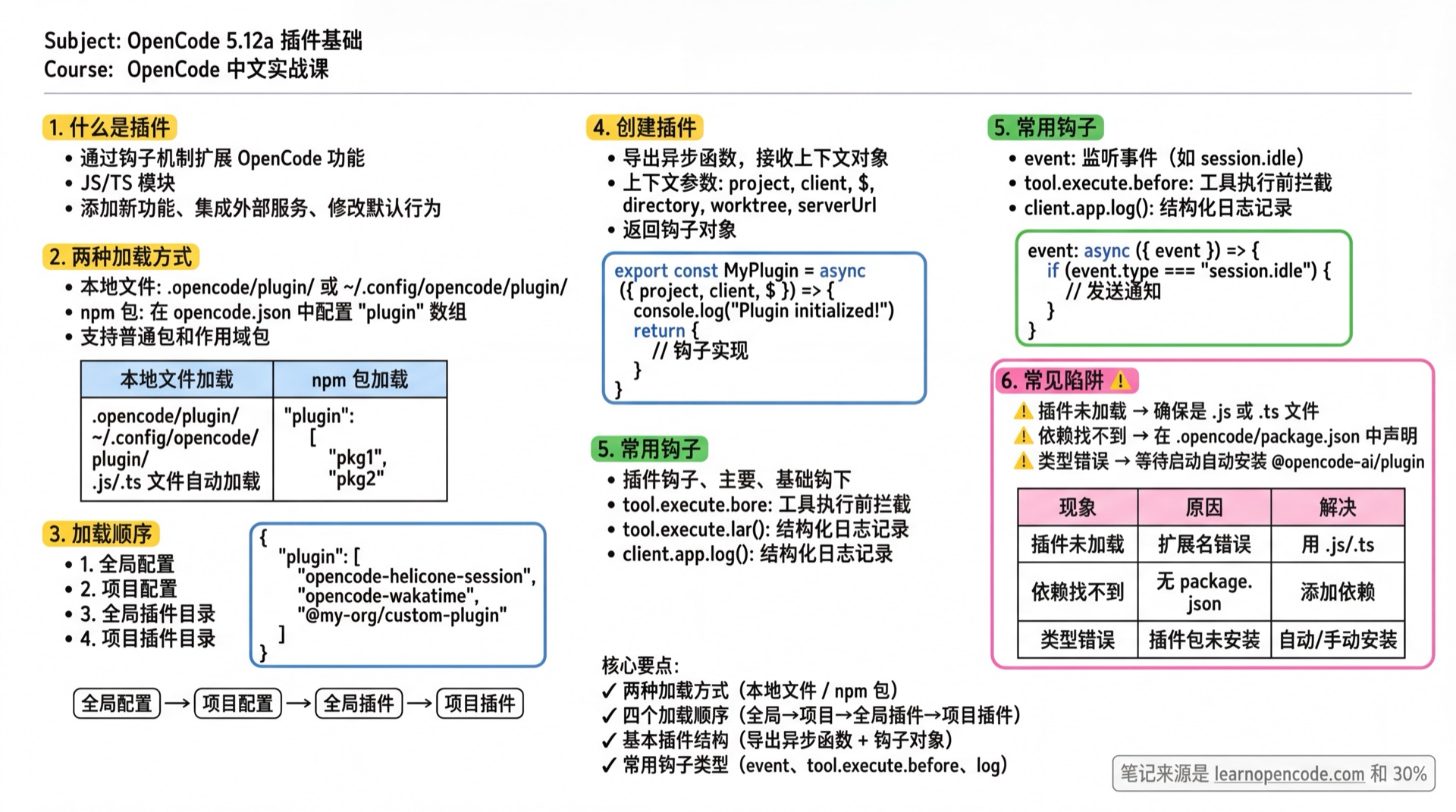
学完你能做什么
- 安装和配置插件(npm 包和本地插件)
- 配置本地开发中的插件(绝对路径方式)
- 创建简单的本地插件
- 理解插件加载机制和导出规范
- 调试插件加载问题
什么是插件
插件是 JavaScript/TypeScript 模块,通过钩子机制扩展 OpenCode。你可以:
- 添加新功能(如自定义工具、通知)
- 集成外部服务(如时间追踪、监控)
- 修改默认行为(如拦截文件读取、修改 LLM 参数)
社区插件示例请查看 生态系统。
使用插件
有两种方式加载插件:
从本地文件加载
将 JavaScript 或 TypeScript 文件放在插件目录中:
| 目录 | 作用域 |
|---|---|
.opencode/plugin/ | 项目级插件 |
~/.config/opencode/plugin/ | 全局插件 |
这些目录中的 .js 和 .ts 文件会在启动时自动加载。
从 npm 加载
在配置文件中指定 npm 包:
// opencode.json
{
  "$schema": "https://opencode.ai/config.json",
  "plugin": [
    "opencode-helicone-session",
    "opencode-wakatime",
    "@my-org/custom-plugin"
  ]
}支持普通包和作用域包(@scope/package)。
从本地路径加载(开发模式)
如果你在本地开发插件,可以直接在配置文件中指定插件的绝对路径:
// opencode.json
{
  "plugin": [
    "/home/user/my-plugins/custom-tool/dist/index.js"
  ]
}注意:
- 使用绝对路径,指向编译后的
.js文件 - 不需要
file://前缀 - 路径要指向具体的 .js 文件,不是目录
| ❌ 错误写法 | ✅ 正确写法 |
|---|---|
"file:///home/user/my-plugin" | "/home/user/my-plugin/dist/index.js" |
"/home/user/my-plugin" | "/home/user/my-plugin/dist/index.js" |
"/home/user/my-plugin/dist" | "/home/user/my-plugin/dist/index.js" |
插件安装机制
npm 插件
启动时使用 Bun 自动安装。包及其依赖缓存在:
~/.cache/opencode/node_modules/本地插件
直接从插件目录加载。要使用外部 npm 包,需在配置目录创建 package.json:
// .opencode/package.json
{
  "dependencies": {
    "shescape": "^2.1.0"
  }
}
OpenCode 启动时会运行 bun install 安装这些依赖。
内置插件
OpenCode 自带两个内置插件(可通过 OPENCODE_DISABLE_DEFAULT_PLUGINS=1 禁用):
| 插件 | 功能 |
|---|---|
opencode-copilot-auth | GitHub Copilot 认证 |
opencode-anthropic-auth | Anthropic 认证 |
加载顺序
插件从所有来源加载,钩子按以下顺序执行:
- 全局配置(
~/.config/opencode/opencode.json) - 项目配置(
opencode.json) - 全局插件目录(
~/.config/opencode/plugin/) - 项目插件目录(
.opencode/plugin/)
去重规则:
- 同名同版本的 npm 包只加载一次
- 本地插件和同名 npm 插件会分别加载
- 同一模块导出的相同函数只初始化一次(防止
export default和命名导出重复)
创建插件
插件是一个导出插件函数的模块。每个函数接收上下文对象并返回钩子对象。
基本结构
// .opencode/plugin/example.js
export const MyPlugin = async ({ project, client, $, directory, worktree, serverUrl }) => {
  console.log("Plugin initialized!")

  return {
    // 钩子实现
  }
}
插件上下文参数
| 参数 | 类型 | 说明 |
|---|---|---|
project | Project | 当前项目信息 |
directory | string | 当前工作目录 |
worktree | string | Git 工作树路径 |
client | OpencodeClient | OpenCode SDK 客户端,用于与 AI 交互 |
$ | BunShell | Bun 的 shell API,用于执行命令 |
serverUrl | URL | OpenCode 服务器 URL(如 http://localhost:4096) |
TypeScript 支持
使用 TypeScript 时,可以从插件包导入类型:
// .opencode/plugin/my-plugin.ts
import type { Plugin } from "@opencode-ai/plugin"

export const MyPlugin: Plugin = async ({ project, client, $, directory, worktree, serverUrl }) => {
  return {
    // 类型安全的钩子实现
  }
}
插件包会在启动时自动安装到 .opencode/node_modules/。
插件导出规范(重要!)
插件只能导出 default 函数,不要导出其他变量或函数:
// ✅ 正确:只导出 default
export default MyPlugin;

// ❌ 错误:同时导出其他内容
export default MyPlugin;
export { getConfig, DEFAULT_CONFIG }; // 会导致加载失败!原因:OpenCode 会把模块的所有导出都当作插件函数调用。如果导出了非函数值(如对象、常量),会报错:
ERROR: fn is not a function. (In 'fn(input)', 'fn' is an instance of Object)如果你需要在外部使用插件的配置或工具函数,应该:
- 把它们放在单独的文件中导出
- 或通过插件的
config钩子动态注册
简单示例
发送通知
当会话完成时发送系统通知:
// .opencode/plugin/notification.js
export const NotificationPlugin = async ({ $ }) => {
  return {
    event: async ({ event }) => {
      if (event.type === "session.idle") {
        await $`osascript -e 'display notification "Session completed!" with title "OpenCode"'`
      }
    },
  }
}
如果你使用 OpenCode 桌面应用,它可以在响应就绪或会话出错时自动发送系统通知。
.env 文件保护
阻止 OpenCode 读取 .env 文件:
// .opencode/plugin/env-protection.js
export const EnvProtection = async () => {
  return {
    "tool.execute.before": async (input, output) => {
      if (input.tool === "read" && output.args.filePath.includes(".env")) {
        throw new Error("Do not read .env files")
      }
    },
  }
}
日志记录
使用 client.app.log() 替代 console.log 进行结构化日志记录:
// .opencode/plugin/my-plugin.ts
export const MyPlugin = async ({ client }) => {
  await client.app.log({
    service: "my-plugin",
    level: "info",
    message: "Plugin initialized",
    extra: { foo: "bar" },
  })

  return {}
}日志级别:debug、info、warn、error。
踩坑提醒
| 现象 | 原因 | 解决 |
|---|---|---|
| 插件未加载 | 文件扩展名错误 | 确保是 .js 或 .ts 文件 |
| 依赖找不到 | 未配置 package.json | 在 .opencode/ 目录添加 package.json |
| TypeScript 类型错误 | 插件包未安装 | OpenCode 启动后会自动安装,或手动运行 bun add @opencode-ai/plugin |
| 插件重复执行 | 同时使用 npm 和本地插件 | 检查配置文件和插件目录是否有重复 |
| 环境变量未生效 | 本地插件无法访问外部包 | 在 .opencode/package.json 中声明依赖 |
fn is not a function | 插件导出了多个非函数值 | 只保留 export default,移除其他导出 |
| 本地插件路径无效 | 路径写法错误 | 使用绝对路径指向 .js 文件,不要用目录 |
调试插件加载
如果插件没有正常工作,可以用 debug 模式查看加载日志:
# 查看插件加载和错误信息
opencode run "test" --log-level DEBUG --print-logs 2>&1 | grep -E "(plugin\|error)"
正常加载的输出示例:
INFO service=plugin path=file:///home/user/my-plugin/dist/index.js loading plugin
INFO service=tool.registry status=started my_custom_tool
INFO service=tool.registry status=completed my_custom_tool
加载失败的输出示例:
ERROR service=plugin path=file:///home/user/my-plugin/dist/index.js error=fn is not a function本课小结
你学会了:
- 三种加载插件的方式(本地目录 / 本地路径 / npm 包)
- 本地开发插件的正确配置方法(绝对路径指向 .js 文件)
- 插件的加载顺序和去重机制
- 创建简单插件的基本结构和导出规范
- 使用
event和tool.execute.before钩子 - 调试插件加载问题的方法
下一步
→ 5.12b 插件进阶 - 学习所有钩子类型和高级用法